At CourtReserve, we’re constantly asking one question: what’s causing friction for our racquet sports clubs and players? We look for the moments where clubs lose time, miss revenue, or where players hit unnecessary roadblocks.
With our January–March releases, we took that challenge head-on by removing barriers for new players, elevating the on-court experience, and giving racquet and paddle clubs better tools to manage, track, and grow.
Here’s what’s new in CourtReserve:
Video Transcript
0:099 secondsjoining us today for our weekly Thursday installment of our education series.
0:1313 secondsToday’s series we’re going to cover what’s new in court reserve in Q1 of 2026. We’re going to cover things that
0:2121 secondswere released January through March and we had a lot of lot of really exciting stuff that went out. So today will be more of an educational webinar just to
0:2929 secondsshow you what we’ve been working on over the last quarter and uh we might be telling you about some things that we have coming soon too. So thanks again
0:3737 secondsfor joining us. If you have questions as we go along, there is a Q&A section. If you’re in a Zoom window, it might be hidden behind some three dots somewhere
0:4646 secondsin your toolbar. If you’re in a Zoom uh browser window, there should also be three dots that you can click somewhere
0:5252 secondsto be able to um get to that Q&A section. But we like to have all everything go into the Q&A section because then we can see all of your
1:001 minutequestions after. We can send you a response if there’s something that maybe we didn’t quite answer while we were going through. So, please avoid putting
1:071 minute, 7 secondsthings in the chat. Um the chat is not something that we typically can have really good access to following these webinars. So, Q&A section is your
1:151 minute, 15 secondsfriend. All right, Josh, if you want to advance us a little bit. Couple of housekeeping things to tell you guys about before we get started though. Uh
1:231 minute, 23 secondswe are in the process of our Catalyst tour for 2026. We’ve got amazing stops planned throughout the year. This month,
1:321 minute, 32 secondsApril 23rd, we will be in Columbus,
1:341 minute, 34 secondsOhio. Um then we’ll be in Detroit in May and then Denver in the summer. We’re even going to Canada in August. So if
1:431 minute, 43 secondsyou’re Canadian, you’re up north, you’re in the Northeast, we’ll be in Toronto.
1:471 minute, 47 secondsUh so make sure you get those tickets to Catalyst because we love to see you. So much education. It’s a day and a half.
1:531 minute, 53 secondsSo the first day is roundtables, hear about best practices and experiences from other clubs and then we have a full
2:002 minutesday of education uh the second day. And so it’s just amazing how much information you can learn, how much information we learn as a product team
2:092 minutes, 9 secondswhen we go to these things too because you guys teach us how you’re using the product and how we can make the product better for you. So definitely check out
2:162 minutes, 16 secondsCatalyst. It’s totally it’s definitely worth the experience. I’ve not heard a customer who’s been dissatisfied after they’ve gone to Catalyst.
2:252 minutes, 25 secondsAnd then also coming up in June, there is another pickle ball mastermind. If you have not learned the tricks and tr
2:322 minutes, 32 secondsor the tips to the trade from Devon and um the Club Pickle Ball USA team, you’re missing out. Um Devon has this MA Club
2:412 minutes, 41 secondsmastermind series and you can go to the mastermind, learn all of the the tricks to the trades. Can’t get that one,
2:482 minutes, 48 secondsright? Um and then also following that there’s monthly calls where you can hear best practices from the industry. You
2:552 minutes, 55 secondslearn new things how to include I think he did a whole talk recently to his mastermind folks about AI and how to start using AI in your facilities. So
3:043 minutes, 4 secondsmastermind’s not just an experience one time go learn a couple things. It’s an ongoing educational experience to learn from industry leaders in the pickle ball
3:113 minutes, 11 secondsindustry. So definitely give Devon a shout if you’re interested in learning more. Couple more things. If you haven’t been to courtresveerve.com/webinars,
3:203 minutes, 20 secondswhich is hopefully this is where you’ve signed up for this webinar, uh please do. We’ve got a lot of things going and things that you can sign up for to learn more about today’s what’s new is there.
3:293 minutes, 29 secondsWe’ll be talking about the new court reserve play site integration um next week. And then we’ve got a new series that we’re running called courtside
3:373 minutes, 37 secondsconversations where Ashley and our industry professionals are talking about best practices within the club. The next
3:443 minutes, 44 secondsone we have coming up is on um April 28th and it’s going to talk about public booking and best practices for public
3:523 minutes, 52 secondsfacilities and how they set up their club. So don’t miss those.
3:573 minutes, 57 secondsAnd then last but not least, if you are out and about at industry events coming up in the next couple of weeks, please say hi to our court reserve team. We
4:044 minutes, 4 secondswill be at these conferences, USP, the USA Southern, the Director’s Club, World Pickle Ball Conference, USA Middle States. Um, so check those out and come
4:134 minutes, 13 secondssay hi if you’re there because we would love to see you and we would love to meet you in person. All right. And then again,
4:204 minutes, 20 secondscorreserve.com/webinars.
4:234 minutes, 23 secondsLearn more from our weekly spark series uh where we teach youth something from the product. We do this as a rotation throughout um our different teams. So
4:324 minutes, 32 secondsyou’re going to learn something new from a different team every week. Um, and then again, courtside conversations are great is a great series that Ashley has
4:394 minutes, 39 secondsstarted about um just uh industry leaders getting together and talking about court reserve and those best practices. So, with that, I’m going to
4:484 minutes, 48 secondskick it over to Matt. Again, remember to use that Q&A section if you have questions as we go through so we have a record of what those questions are. And
4:564 minutes, 56 secondshere we go. We’re going to talk about Q1 2026. Matt.
5:005 minutesYeah. Well, good afternoon everybody. Uh so there are two releases that I want to point out. The first one is for multi-day events and we’ve now added an
5:105 minutes, 10 secondsexpanded details table and this table is now reflected in both the transaction list and also the sales summary when you’re using that detailed output type.
5:205 minutes, 20 secondsUh so previously when you had these multi-day events and you expanded those details, it would just be a white text box listing all of the dates in that
5:285 minutes, 28 secondsevent in just one continuous row. So we’ve updated that and added this detailed table where each event is now broken out into its own occurrence uh
5:365 minutes, 36 secondsdisplaying on its own row and we’ve so each date is listed as well as the cost per occurrence. Um so breaking out that
5:445 minutes, 44 secondstotal fee date across each of the event occurrences. Um so this is in hopes to make it much easier to see at a glance
5:525 minutes, 52 secondswhich dates are included in a given event fee and then also what that individual cost is. Um, and if you’re
5:595 minutes, 59 secondsusing the acrruel basis preset filter on your sales summary, this will also be helpful in that when you run a report
6:066 minutes, 6 secondsthat only covers a portion of your event’s full date range, the table’s only going to show the occurrences that fall within that selected report period.
6:156 minutes, 15 secondsUm, so we haven’t made any changes to how event fees display on the acrual basis report or how they’re calculated.
6:226 minutes, 22 secondsThe goal here is mainly just to show additional details and add some clarity so you don’t have to do that extra math to confirm the numbers on that report
6:306 minutes, 30 secondsbecause if we’re being honest, nobody wants to do extra math. Um, so this helps show where those numbers are coming from and what’s driving the
6:386 minutes, 38 secondstotals on that report. And as part of that only on the transaction list so far, we’ve added this new export option.
6:466 minutes, 46 secondsSo as you see on the top right of the screenshot, the export is now a dropown.
6:506 minutes, 50 secondsAnd we’ve added a third option that’s labeled as export with details. So when you select this option, when you have those multi-day events on your report
6:586 minutes, 58 secondsinstead of them showing up as just a single line uh with one event fee, each individual occurrence will show up as
7:057 minutes, 5 secondsits own row on the Excel file um showing the individual date and the cost per occurrence. Um, we’ve also added a
7:147 minutes, 14 secondscolumn to add to kind of call this out on the report that’s labeled occurrence.
7:187 minutes, 18 secondsAnd it will note which occurrence that event is in the overall event. So whether it’s the first of 10 or second of 10, etc. Um, just to point out that
7:277 minutes, 27 secondsthese are these individual rows are part of a multi-date event rather than being their own separate charges.
7:367 minutes, 36 secondsAnd then the second release that I want to point out is on the aged fees report.
7:407 minutes, 40 secondsWe did add an additional option for how those hedged fees are bucketed on that report. So, previously you could have
7:477 minutes, 47 secondsthem sorted by the transaction date only or when the booking was was made. But now we’ve added this additional option if you want those to be sorted and
7:557 minutes, 55 secondsorganized by the service date or when the booking event actually took place.
8:018 minutes, 1 secondUm, so no changes to how the fees or for when the fees show up on this report,
8:068 minutes, 6 secondsmeaning uh future dated fees will not show up. Um, it’s still based on when either the transaction was booked or
8:148 minutes, 14 secondswhen the service took place. Um, but it’s just a matter of organizing which giving you some flexibility to see how you want those outstanding balances organized.
8:248 minutes, 24 secondsAnd uh, yeah, that was it from me.
8:288 minutes, 28 secondsAwesome. Thank you very much, Matt. It looks like we do have a question in the Q&A that’s unrelated to these releases. So, um, still related to your team. So,
8:368 minutes, 36 secondsI’ll let you just take a look at that and answer that how you’d like to in the Q&A chat. Okay.
8:418 minutes, 41 secondsSo, I’m gonna Yeah, of course. I’m going to move over to my section. Um, I have a lot of releases and a lot of different parts of Core Reserve, so I tried my best to organize them the best I could.
8:518 minutes, 51 secondsUm, the first thing I’m going to go over is the message history tab that we have added to the members details page. This is going to be a new tab that will allow
9:009 minutesyou to see all communications that have been sent to this player. So whether that be system notifications or any type
9:089 minutes, 8 secondsof bulk communication you have been sending, you’ll be able to see all emails, push notifications, and text that have been sent to this player. Um,
9:179 minutes, 17 secondswe did have ways to filter this on our notifications page, but when it came to bulk communications, there was never an
9:259 minutes, 25 secondseasy way to see all of the communications that were sent to one player. So, we have added this here just so that you are able to see any
9:349 minutes, 34 secondscommunication that has gone to an individual or to a family in your organization.
9:399 minutes, 39 secondsThe one thing that I will point out is system notifications do automatically delete after 30 days. So when you’re
9:469 minutes, 46 secondslooking at this view, you’re really only going to be able to see those system notifications from the last 30 days. But in terms of bulk communication, we will
9:559 minutes, 55 secondshave all of that history there for you to take a look at.
10:0010 minutesThe next thing that I have to go over are some new subadmin permissions that we have added whenever you are creating
10:0710 minutes, 7 secondsor editing a subadmin. And these are all going to be related to membership visibility and membership management. So
10:1610 minutes, 16 secondspreviously in the system, we actually had no permissions that were related to memberships in any way. So there was no
10:2310 minutes, 23 secondsway for a subadmin to even see membership details um or manage them. So you know, if they were a front desk
10:3110 minutes, 31 secondsstaff and there was somebody that came up to ask for some more information on a membership, we never had a clear way of showing that information on the admin
10:4010 minutes, 40 secondsside of core reserve. So we’ve added two permissions here. The first one is going to be can view memberships. This is going to allow them to see the
10:4910 minutes, 49 secondsmemberships option on the sidebar. Allow them to look at the both individual and family membership list as well as the
10:5710 minutes, 57 secondsmembership weight list list as well. And it will let them also look at the details for this membership. The only thing that’s different is that edit
11:0611 minutes, 6 secondsbutton that an admin would see is now going to be a view button. And if they ever go to the membership type details
11:1311 minutes, 13 secondspage, all of that information is going to be read only and they would not be able to actually edit that information.
11:2111 minutes, 21 secondsSo, if they wanted to take a look at the different prices that are offered, um maybe the start and end date range for that specific membership. Of course,
11:2911 minutes, 29 secondssome of that information is going to be on the main membership dashboard, but if they ever do need to drill down and look at some more detailed information about
11:3711 minutes, 37 secondsa membership with the can view membership option, they would be able to at least read that information. Now, and then in addition to that, we have the
11:4611 minutes, 46 secondscan manage memberships option. This is going to allow them to look at the membership details page and actually
11:5311 minutes, 53 secondsedit the details about that specific membership type. So, if they need to adjust start dates and end dates or purchase dates or the price of that membership, they would be able to do so.
12:0512 minutes, 5 secondsThe only page or tab they would not be able to view as a subadmin is going to be that general membership settings tab.
12:1312 minutes, 13 secondsThat would typically apply here for full admins. So, um, with the manage memberships, they would at least be able
12:2012 minutes, 20 secondsto edit specific details about specific membership types. Um, but we are restricting some of that access and
12:2812 minutes, 28 secondsleaving some of it so that only an admin would be able to edit that information.
12:3512 minutes, 35 secondsIn addition to that, we have some improvements that we’ve made to the patch retention integration that I did want to point out and that were brought
12:4312 minutes, 43 secondsup to us in support. So thank you to those customers for sharing these specific use cases to us so that we could make these improvements. Um the
12:5212 minutes, 52 secondsfirst one is related to when we are detaching a member from a family. So previously when we detached a member from a family in court reserve that
13:0013 minuteswould mark this player as a new member on patches side and that would make this new detached account be triggered in all
13:1013 minutes, 10 secondsof the new member automations that you have on on the patch side. um which obviously creates an issue there because those are members that have already
13:1813 minutes, 18 secondsreceived that communication. Um they’re obviously not actually new members. So we have made an update here so that whenever somebody is detached from a
13:2713 minutes, 27 secondsfamily, we are going to bypass any new member automations that you have created in patch.
13:3413 minutes, 34 secondsThe second update that we’ve done is when we are sending check-in data to patch and we are looking at an event
13:4113 minutes, 41 secondsregistration, we are now also including any event tags that you have created and assigned for that event. Um, this just
13:4913 minutes, 49 secondscreates another set of data that you can use as your filtering players for your blasts or whenever you are, you know,
13:5713 minutes, 57 secondsfiltering to create automations. you’re now going to be able to utilize those event tags that you have created inside of core reserve.
14:0714 minutes, 7 secondsAll right. And then next we have an update here related to leagues and the duper integration. Um, so for anybody
14:1414 minutes, 14 secondsthat is using both the duper integration and leagues, you will know that when you have finished a game day and you have added in your match results, previously
14:2414 minutes, 24 secondswe had a duper upload button and this would give you an Excel sheet that had all of the uh information pre-formatted
14:3214 minutes, 32 secondsso that way you could easily manually upload this information to duper.
14:3714 minutes, 37 secondsEarlier this year they had changed the formatting for that Excel sheet when you upload it. So we have updated the duper
14:4414 minutes, 44 secondsupload excel sheet format so that it now does align with the formatting that duper needs whenever you are uploading
14:5114 minutes, 51 secondsthose match results. But in addition to that we have also added a sync to duper button that will make it so that you do
15:0015 minutesnot have to go into duper manually and upload these results. This is going to automatically bring these match results to duper with a click of two buttons. So
15:0915 minutes, 9 secondswhen you click on sync to duper, it’s going to give you a confirmation modal letting you know how many players results will actually be sent to duper.
15:1815 minutes, 18 secondsOnce you hit confirm, you are all good to go. Now the one thing to point out here is that in order for these match results to successfully sync to duper,
15:2915 minutes, 29 secondsevery player in that specific match would need to have a duper ID. So in the case where there is a match where there
15:3615 minutes, 36 secondsis one or more players that don’t have a duper ID, there is going to be a warning call out on that confirmation modal
15:4415 minutes, 44 secondsletting you know how many players or how many matches will not be able to have their results sent to duper. So that way that information is all super clear to
15:5315 minutes, 53 secondsyou before you’re actually syncing those results over to duper.
16:0016 minutesAll right. And then the next improvement is for our UK customers that are using Stripe specifically. Um for our UK
16:0716 minutes, 7 secondscustomers, there is a requirement to have 3D secure authentication whenever you are processing payments online. This
16:1516 minutes, 15 secondsis an additional step that is required in the UK where the player needs to verify their identification before they
16:2316 minutes, 23 secondscan process any payments online. So really only applies to our UK customers.
16:2816 minutes, 28 secondsUm, and we’ve made some improvements here so that that authentication step is now going to be added to every checkout page that we have in court reserve. Um,
16:3816 minutes, 38 secondspreviously we only had it on a few of the payment flows that we have in the system, but we’ve now improved it so now
16:4516 minutes, 45 secondsthat it will show up on the pay invoice page, on the pay membership page, our typical checkout page, our upfront
16:5316 minutes, 53 secondspayment page. So that way um UK customers and players are not going to be restricted to specific flows in order to actually process a payment.
17:0517 minutes, 5 secondsAll right. And then the next one is related to the attendance tracker. If you are using the attendance tracker,
17:1217 minutes, 12 secondsI’m sure you know that we have a warning sound that you can enable um in two different cases. one, whether the
17:1917 minutes, 19 secondsplayer’s amount due exceeds zero dollars or whether that player has an inactive or suspended membership. Previously,
17:2617 minutes, 26 secondsthis setting was not looking at an additional portal setting that we have where we can exclude future reservations or events from the amount due, which is
17:3517 minutes, 35 secondsultimately going to hide these future services fee amounts from the amount due that the player had.
17:4217 minutes, 42 secondsSo, if a player had a future reservation that was say $20, um they wouldn’t actually see that amount in their amount due until that reservation has passed.
17:5317 minutes, 53 secondsThe setting previously wasn’t looking at this additional portal setting that we have. So, in some cases, you would have
18:0018 minutesan amount due of $20, but from the player’s perspective, it would look like $0 and they would still hear this
18:0718 minutes, 7 secondswarning sound. So now we are considering this additional portal setting that we have if you have it checked when we are
18:1518 minutes, 15 secondsplaying this warning sound from the attendance tracker. And if the players amount due is really only from future
18:2218 minutes, 22 secondsreservations or events um we’re going to make sure that that’s not being included in this amount due override warning
18:2918 minutes, 29 secondssound that would that would uh sound for the player when they check in.
18:3418 minutes, 34 secondsHey Josh, real quick before you move past that slide, there is a question.
18:3918 minutes, 39 secondsUm, where is this page that we’re looking at right now on the screen?
18:4418 minutes, 44 secondsYeah, so this is going to be on the attendance tracker setup page. The attendance tracker is an additional feature that you would need to enable.
18:5218 minutes, 52 secondsSo, if you don’t yet have it enabled or if you’re trying to locate this page,
18:5718 minutes, 57 secondsyou’ll want to go to settings on the sidebar, scroll all the way down to the bottom additional features row, and if you don’t have it enabled, you’ll want
19:0619 minutes, 6 secondsto go to the additional features page to actually enable the attendance tracker.
19:1119 minutes, 11 secondsUm, from there, once you have it enabled, you’re going to have an attendance tracker page that you can find under the additional features row.
19:2019 minutes, 20 secondsUm, and once you click on that attendance tracker page, that’s going to be the page from this screenshot right here.
19:2719 minutes, 27 secondsSo once Oh, yeah, go ahead. I was going to say to clarify,
19:3019 minutes, 30 secondsattendance tracker is a manual attendance tracking. Maybe if you’re a gym or you just want to log foot traffic of customers coming into your facility.
19:4019 minutes, 40 secondsIf you’re truly just relying on players like checking checking in for reservations and events, you might not necessarily need attendance tracker. Um,
19:4819 minutes, 48 secondsso we do have a great KB article,
19:5019 minutes, 50 secondsknowledgebased article if you were to look at attendance tracker and kind of the use cases that you might use to support it.
19:5719 minutes, 57 secondsThank you very much, Kim.
20:0120 minutes, 1 secondAll right. And then next, I have an update related to the branded domains page. So if you are using a branded
20:0820 minutes, 8 secondsdomain on your member portal, um, we have added an additional setting here so that you can enable Google Tag Manager.
20:1520 minutes, 15 secondsIn that case, you would just need to input your container ID for Google Tag Manager. And then from there, you would
20:2320 minutes, 23 secondshave your Google Tag Manager synced up and ready to go on your member portal.
20:2720 minutes, 27 secondsSo that way you can get some of those analytics based on uh purchases and traffic on your member portal. Um this
20:3520 minutes, 35 secondsis only available if you are using a branded domain. So, if you have purchased a domain and you own one, but
20:4220 minutes, 42 secondsyou don’t have this set up yet on your member portal and you are interested,
20:4720 minutes, 47 secondsum, if you go to the additional features page, there’s going to be that option for the branded domain. And once you have the branded domain set up, you
20:5420 minutes, 54 secondswould then be able to add the Google Tag Manager container ID to your member portal.
21:0321 minutes, 3 secondsAll right. Um and then the next update I have is related to our customers that have access to our API. We have a few improvements that we have released here.
21:1321 minutes, 13 secondsSo the first improvement that I’ll touch on is you are now going to be able to generate multiple API keys for a single
21:2121 minutes, 21 secondsorganization or location. Previously you were not able to create multiple API keys and you really only had access to
21:2921 minutes, 29 secondsone. So now you are able to create multiple API keys. You know, maybe you have a web designer or a lender that you
21:3721 minutes, 37 secondsneed to give these credentials to. You can now create specific credentials for these people that need to have access to
21:4421 minutes, 44 secondsyour API. And in addition to that, when we are creating API credentials or editing API credentials, we’ll now be
21:5221 minutes, 52 secondsable to choose from two different access types. So the first one is going to be full access. that will just give us full access to all endpoints in our API. Or
22:0222 minutes, 2 secondswe can give restricted access which will allow the ad the admin to pick and choose which specific categories these API credentials should have access to.
22:1422 minutes, 14 secondsIn addition to that, once we have given this API credential access to specific categories, we can choose if they have
22:2322 minutes, 23 secondsjust read access. So just be able to read data from the API or if they should also have write access and be able to
22:3122 minutes, 31 secondscreate, update and delete from specific categories in the API. So now if we are
22:3822 minutes, 38 secondsgiving access to specific people for specific use cases, we can make sure that when we’re generating API
22:4522 minutes, 45 secondscredentials for them, they are not getting access to any other data that’s not applicable to them. um and just create a much more secure experience in
22:5422 minutes, 54 secondsthose cases where we need to give limited access of from our API to these specific people.
23:0323 minutes, 3 secondsAll right. And last but not least, our play site integration is now fully live and available to all customers. So we
23:1023 minutes, 10 secondshave expanded our integration provider options when it comes to video recording at your software um or at your facility.
23:2023 minutes, 20 secondsSo, with PlaySt the main standout here is when you are recording a session as a player, there’s
23:2823 minutes, 28 secondsgoing to be two different recording types that we can choose from. There’s going to be just a typical uninterrupted recording. Um, just a typical recording
23:3623 minutes, 36 secondsof the play, but then there’s also going to be this recording plus AI highlight option. And with this option, when the
23:4423 minutes, 44 secondsplayer is recording their reservation or their registration, Playsite has the ability to add these analytics and these
23:5223 minutes, 52 secondshighlights um using AI for that specific recording.
23:5723 minutes, 57 secondsThe AI highlight recording is something that the player would need to subscribe to. So if the player has not yet
24:0524 minutes, 5 secondssubscribed to these AI highlights, we do give them a float to be able to do this directly inside of court reserve. Once
24:1324 minutes, 13 secondsthey have subscribed to the AI highlights, there is going to be a a monthly subscription payment that they would be responsible for. But as long as
24:2024 minutes, 20 secondstheir subscription is active, that would then unlock this new recording type for them and be able to get those AI
24:2824 minutes, 28 secondshighlights and analytics for any recording that they are processing at your facility.
24:3524 minutes, 35 secondsAwesome. I know there was a lot, but I think that finishes up everything on my end. So, is there any other questions in the Q&A before I move over to you, Kim?
24:4424 minutes, 44 secondsThere is. Um, there’s actually one question right now about play. Do we have an estimated number of clubs that are using PlaySite right now? Do you have any um numbers on that?
24:5424 minutes, 54 secondsUh I don’t have a super upto-date number on how many people are using Playsite,
25:0025 minutesbut what I can say is when we were in beta for Playite, I know that we had I believe 18 customers that were using the
25:0825 minutes, 8 secondsintegration. I’m sure it’s gone up since then, but I that’s the last number that I had heard and that was that was I
25:1525 minutes, 15 secondsbelieve earlier or the end of March I think.
25:1925 minutes, 19 secondsAwesome. There’s another question about the AI highlights. Do they have to subscribe to AI highlights before the match or can they do it after the game?
25:2825 minutes, 28 secondsYeah, so they would need to subscribe to the AI highlights before they initiate that recording. um which is why we have
25:3525 minutes, 35 secondsthat subscribe option in the flow where they are initiating the recording. So they would need to enable that before they actually start that recording.
25:4525 minutes, 45 secondsOkay, awesome. And then the another question about playsite here, how does a member find play site? Tell us about this play site row actually that we’re looking at here on your screenshot.
25:5525 minutes, 55 secondsYeah. So, for our video recording integrations, whenever you have that integration enabled, there’s going to be a new row that lives on the homepage of
26:0426 minutes, 4 secondsyour mobile app. So, in this screenshot here, you can see it’s going to be right below the my bookings row. And from here, this is going to be where a player
26:1226 minutes, 12 secondscan initiate a recording. So, once they hit record my session, that’s going to be when they then pick the courts, the duration, and that recording type. Um,
26:2226 minutes, 22 secondsand one thing I will add that applies to both of our video recording integrations. You will be able to choose these specific courts that you can
26:3126 minutes, 31 secondsinitiate a recording on. And you can also set up recording restrictions. So that way a player is only able to record a court if they have a booking on it.
26:4226 minutes, 42 secondsUm, and then to take that another step forward, you can also have it set so that they can only record courts that
26:4926 minutes, 49 secondsthey have a reservation on only after they have checked into the facility for that specific reservation or event.
26:5726 minutes, 57 secondsOkay. And then if we go back to actually the email notification bounceback or the email notifications tab that you did
27:0427 minutes, 4 secondsvery I think it was the first thing that you talked to us about.
27:0627 minutes, 6 secondsLet me go back a bit. Um, but basically the question is just if an email notification bounces, is that going to show here?
27:1527 minutes, 15 secondsRight now I do not believe we have those specific statuses that we’ve updated on the on the send email details page. Um,
27:2427 minutes, 24 secondsright now we just have the check box for if the email has been sent or not, but that’s great feedback for us to include to this specific tab here.
27:3227 minutes, 32 secondsOkay, awesome. And, uh, we do have a question about what is a branded domain.
27:3727 minutes, 37 secondsWe might not have to have enough time to actually go over fully what a branded domain is in this call. Um, but I do
27:4427 minutes, 44 secondsencourage you to uh look at our knowledgebased article. Um, it does deep dive into branded domains. But Josh, do
27:5127 minutes, 51 secondsyou have any sort of uh a short snippet on what that might be? Yeah, I can go over it super high level.
27:5727 minutes, 57 secondsSo, if you own a domain already and you want to have a branded domain for your member portal, so let’s say um rather
28:0628 minutes, 6 secondsthan app.correserve.com as your URL to get to your member portal, maybe you have uh I’ll just use
28:1528 minutes, 15 secondswillie.com as a as an example here. Um you can update your domains for your member portals that they become
28:2228 minutes, 22 [email protected] rather than app.cortreserve.com.
28:2728 minutes, 27 secondsSo, if you already have a a domain and you already own it, this is a way for you to just better brand your URLs for your core reserve member portal.
28:3728 minutes, 37 secondsOkay, that’s an amazing amazing overview of what it is. So, good job there. Um,
28:4328 minutes, 43 secondsawesome. I’m happy to take over from here.
28:4628 minutes, 46 secondsAwesome. Sounds good. Let me stop sharing.
28:4928 minutes, 49 secondsI may have forgot to send the share request before we started. So,
28:5328 minutes, 53 secondsno worries. I just allowed it. So, you should be good to go. All right, cool. Awesome. All right, everybody.
29:0029 minutesWell, to start with my section, we’re just going to talk about a couple of port reserve data and infrastructure improvements that we’ve made in Q1. Um,
29:0829 minutes, 8 secondsthis was really um some exciting stuff for us. We’ve been doing a lot of just looking at uh how we support you as clubs and behind the curtains, the
29:1729 minutes, 17 secondsprocesses that we’re running and things like that and how can we rewrite things to be more efficient um for technology today. So, one of the ones that we did
29:2629 minutes, 26 secondsuh look at in early March, actually, it was early March. There were um some member we had an issue with some of the autopays that processed in early March
29:3429 minutes, 34 secondsof this year. And some of memberships set to bill on the first of the month were actually processing really slowly.
29:3929 minutes, 39 secondsAnd that was causing accounts to show as expired for um even up to a few days.
29:4429 minutes, 44 secondsAnd so, um that caused a problem where members couldn’t really book until the admin manually paid out their fees for them. So we took a look at our processes
29:5329 minutes, 53 secondsand um our engineering team rebuilt and released that entire billing process. So renewals are now running much faster and more efficiently. Um so this shouldn’t
30:0230 minutes, 2 secondsbe happening again going forward, but we had a lot of customers flag us for this early on in in March. And so we did address it very very quickly and turned around a fix very very quickly for that.
30:1230 minutes, 12 secondsSo thank you for bringing that to our attention.
30:1530 minutes, 15 secondsAnd then another big improvement that we made in Q1 was a migration to Azure cloud migration. And so you may have seen a lot of maintenance messages that
30:2330 minutes, 23 secondscame from our COO over the last couple of months just informing you of some outage periods and court reserve. Those were related to this Azure cloud
30:3130 minutes, 31 secondsmigration. And so we’ve moved to an enterpriseg grade of Azure cloud databases which is significantly faster
30:3830 minutes, 38 secondsand more reliable for a lot of the reporting that you do as admins on a day-to-day basis. Um, we’ve also upgraded our application servers to
30:4630 minutes, 46 secondsAzure uh cloud infrastructure which improves overall stability and uptime for our platform as a whole. Um, so
30:5330 minutes, 53 secondsagain less downtime and that’s a huge win for us. Um, so we’re it gives court reserve a lot of the same database
31:0131 minutes, 1 secondbackbones that are trusted by enterprises and companies worldwide. So these are the same data infrastructures that are being used by some of the largest companies in the world. And so
31:1031 minutes, 10 secondswe’re supporting you with these really really wellestablished processes and then it just gives us again a foundation
31:1631 minutes, 16 secondsfor future innovation. So this allows us to be faster to roll out AI features,
31:2131 minutes, 21 secondssmart analytics, new platform capabilities and things like that. So huge shout out to our development team.
31:2631 minutes, 26 secondsThey’ve been working really really hard on this over the last couple of weeks.
31:2931 minutes, 29 secondsUm and we successfully finalized all of our migr migrations this week I think.
31:3431 minutes, 34 secondsSo huge shout out to them for the job well done on that. All right. So, in Q1,
31:4031 minutes, 40 secondswe released public bookings. Um, when I and I did a whole webinar on public bookings in February, it went to general availability. I think it was like
31:4931 minutes, 49 secondsFebruary uh 9th or 16th or something like that, but it was um early part of Q1. And so,
31:5531 minutes, 55 secondspublic bookings is a sharable link that lets anybody that either doesn’t have the court reserve app or an account at your club or a membership book a court
32:0532 minutes, 5 secondswithout actually having to create an account. And so that was one of the problems that we’ve heard from admins for years is that I just have players
32:1232 minutes, 12 secondsthat are visiting or very transient customer base or they just don’t want to create an account. How can they book a court? And so we created this sharable
32:2032 minutes, 20 secondslink that lets anybody book without an account. And so you can post that link for players to book, whether you post it on your main website or you post it on
32:2932 minutes, 29 secondssocial media. And that’s going to drive players to this new booking experience that does not require them to have an account or create an account. They can still log into their account, but again,
32:3932 minutes, 39 secondsthe goal was to remove the friction of having to create an account and still participate at your clubs. It takes upfront payment. It is secure via SMS
32:4732 minutes, 47 secondsverification, so players are required to put in a phone number in order to book a court or register for an event. And so,
32:5432 minutes, 54 secondsyou’re actually not having to worry about bots in that way and stuff like that, too. And then every guest that books for public booking is going to become a contact in your system for
33:0333 minutes, 3 secondsfollow-up. So, with public booking, you get a leads report that shows you every time that person has come to your facility, every time that um how sorry,
33:1233 minutes, 12 secondshow many times that they’ve come to your facility, and then how much money they’ve spent. So, you can target these people too for um potential memberships and things like that or even marketing.
33:2333 minutes, 23 secondsAnd then since we released it, we released it in February, but what have we done since we launched it? So very quickly after we released public
33:3133 minutes, 31 secondsbookings, we also put out waivers. So this screenshot right here is a player that needs to sign a waiver before
33:3933 minutes, 39 secondsthey’re eligible to get that check-in code. So players who book the reservation and own the reservation are required to sign that waiver. Um, if
33:4733 minutes, 47 secondsyou’re a Stripe customer, we also released Apple Pay and Google Pay specifically for public booking. So, if you have a customer that is checking out
33:5633 minutes, 56 secondson a mobile device um and they have Google Pay and Apple Pay, they’re going to see that experience in their public booking flow. Um it’s not available um
34:0534 minutes, 5 secondsto members just yet. Um but we did kind of pilot it with um for Stripe customers
34:1234 minutes, 12 secondswith public booking specifically. And also in the last couple of weeks, we’ve added support for public uh to public booking for booking windows. Um, so if
34:2034 minutes, 20 secondsyou are using booking windows, this is now supported within the um, the times that are available to be picked and
34:2734 minutes, 27 secondsthings like that. And we also got a lot of feedback just around clubs wanted to require email and clubs wanted to be able to hide that check-in code when
34:3534 minutes, 35 secondsplayers came to the facility because they wanted them to visit the front desk. Um, what we’re working on support for countries outside of the US and
34:4334 minutes, 43 secondsCanada. One of the limitations with public booking right now, so you have to be in a country where the plus one is your phone number code. So, um, we’re
34:5334 minutes, 53 secondsworking on support to, um, the UK and beyond. And so, that will validate players for public booking via email
35:0035 minutesinstead of a country code. And then we also are working on adding additional players to lessons. Um, I will be close
35:1035 minutes, 10 secondsto probably rolling that out in beta here very, very soon. So, we’ve gotten a lot of feedback that admins just want to be able to add additional players and
35:1835 minutes, 18 secondsthen collect waiverss from those players. So, we had a person ask in the chat early on um before I started this
35:2535 minutes, 25 secondsthis slide, any creative ways to flag people to include in public bookings that have not yet signed the waiver. So,
35:3135 minutes, 31 secondsif they’re the owner of the reservation and they have not signed the waiver,
35:3535 minutes, 35 secondsthey should already display with that red waiver icon for you when they check in. Um, and they won’t see their check-in code to scan to check in either
35:4335 minutes, 43 secondsuntil they sign that waiver. And you can actually push it to them as an admin,
35:4735 minutes, 47 secondsbut once we add the ability to add additional players from the admin side,
35:5235 minutes, 52 secondsyou’ll be able to push players waivers as well. So, keep an eye out for that because that is coming soon, very fast.
35:5835 minutes, 58 secondsA Google integration. We’re also working on an integration so you’ll be able to add public booking to your Google um business profile and players can find
36:0636 minutes, 6 secondsyour um business on like Google Maps and click a button that says reserve a court and then get to the public booking experience from that. Um Josh who
36:1536 minutes, 15 secondspresented earlier is working on that right now. We had some really really um good made some really good progress on that this week and so it is coming um
36:2436 minutes, 24 secondsbut we are having to work with Google on that. So it takes a little bit of time since we’re working with another big partner. And then access controls, we
36:3136 minutes, 31 secondshave heard a lot of feedback on access controls. So that is something that we are very aware of and we do have on a roadmap.
36:3836 minutes, 38 secondsAll right, Josh, I’m going to pause there. Any questions about public bookings?
36:4336 minutes, 43 secondsYeah, it looks like we have a few questions. So let me try to group all of the ones because I see we have some some similar questions here. So okay,
36:5036 minutes, 50 secondswhere do we find the URL to hook up the public bookings button to our website?
36:5536 minutes, 55 secondsSure. So, when you enable public bookings, immediately you’re going to get this URL here that you see on my screen. I’m kind of highlighting it
37:0337 minutes, 3 secondsright next to the arrow. So, when you get that URL, um you you’re actually your public bookings aren’t going to be
37:1137 minutes, 11 secondsquote unquote active and available until you post this URL somewhere. So, there’s a copy button here or you can highlight and copy it. So, you can do a lot of
37:1937 minutes, 19 secondssetup and testing with public booking before you even make it live to all of your customers. So, I highly recommend just turning it on, you know, adding the
37:2737 minutes, 27 secondssettings here because then once you add um enable it, then you have to allow it for reservations or andor allow it for registrations. And there’s some other
37:3437 minutes, 34 secondssettings to choose from here. I did a whole webinar on this back in February.
37:3937 minutes, 39 secondsVery comprehensive. If you go to courtresve.com/webinars,
37:4237 minutes, 42 secondsit is in that um it is in the past webinars that we’ve done. And it’s also on our YouTube channel, too. We did a So
37:4937 minutes, 49 secondsif you go to our court YouTube.com/cortreserve,
37:5337 minutes, 53 secondsyou should be able to find that public booking webinar there as well.
37:5837 minutes, 58 secondsAwesome. All right. And then next question. Where can you find the leads report?
38:0238 minutes, 2 secondsThe leads report. Great question. So the leads report is only available if you have public booking enabled. Okay. So
38:1138 minutes, 11 secondsonce you enable public booking, it’s going to be in your report section. So if I expanded this right here for
38:1738 minutes, 17 secondsreports and then there once you go down into that report section on the lefth hand side it’s like the third or fourth option down but it’s called leads report
38:2638 minutes, 26 secondsand it’s going to show you again it’s going to group a player by their phone number. So it’s going if a person registers under that phone number that’s
38:3438 minutes, 34 secondshow we’re validating that person’s um pricing and the times that they’ve or how much they’ve spent and how many times they’ve come.
38:4338 minutes, 43 secondsAwesome. Thank you very much. And let’s see here.
38:4638 minutes, 46 secondsAnd I see one. Does public booking require them to sign a waiver? If you have waiver rules set up for the memberships that are mapped to public
38:5438 minutes, 54 secondsbooking. So that’s the other the beauty of public booking is that we did this in a way where you can map it to existing guest memberships that you already have.
39:0339 minutes, 3 secondsUm, so if your general liability waiver is um set to one of these public booking memberships that you’ve um set up here,
39:1239 minutes, 12 secondsthat is going to be the waiver that the player is required to sign. Um, there is an optional scenario if you have a waiver as optional, but I don’t think we
39:2039 minutes, 20 secondshave many clubs that use optional waiverss. Um, so if it’s optional, it’s still optional within public booking,
39:2539 minutes, 25 secondsbut is if it’s required upon login or required upon registration or reservation, that player is going to see
39:3239 minutes, 32 secondsit as part of the booking uh the completion flow. So once they get to that final page, the waiver is on that screen. They can sign it through this
39:4139 minutes, 41 secondsflow and then they can actually see it too after the they sign the waiver.
39:4539 minutes, 45 secondsThere’s an additional information section at the bottom and it’s going to show them their waiver in that additional information section. Awesome.
39:5239 minutes, 52 secondsYeah. Then to point out one of the follow-up questions from that same admin in terms of capturing waivers for the other players of the reservation besides the one that’s making the reservation,
40:0340 minutes, 3 secondswe’d have to do the same flow that we currently do for our member waivers.
40:0740 minutes, 7 secondsCorrect. Where we we have them sign the waiver um when they get to the facility.
40:1240 minutes, 12 secondsYeah. So they can also so that that booking player if they have not signed the waiver before they get there, you can actually push that waiver to them
40:2040 minutes, 20 secondsand have them sign it right in front of you. But if they have additional players that join, um you can have them sign like the guest waiver kiosk too. And I
40:2840 minutes, 28 secondshave an update about the guest waiver kiosk too to kind of help support a lot of public players coming in. Um, but if they you have a member that uses public
40:3740 minutes, 37 secondsbooking, a they’re not going to get their member benefits and b um they’re not going to um it’s not going to recognize that they’ve already signed
40:4540 minutes, 45 secondsthis waiver as a member either. So, keep that in mind. Um I do see a lot of still questions about public booking in here
40:5340 minutes, 53 secondsand these are all great and amazing guys. I’m going to keep moving because I’ve got a lot of stuff to share with you today. Um there is actually a
41:0041 minutescourtside conversations coming up in a couple of weeks about public booking specifically and also um I see questions about what does this look like when it’s
41:0841 minutes, 8 secondsbooked as a public booking and my on my admin side of the system like those are all qu great questions and we did answer those in the webinar that we did
41:1641 minutes, 16 secondspreviously. Um and then also there’s a humongous KB article section excuse me collection dedicated specifically to
41:2441 minutes, 24 secondspublic bookings too where we show you examples of all of these things too. Um,
41:2841 minutes, 28 secondsand our video team is actually almost finished um kind of an overview video for for public booking too and we’ll be dropping that into the KB article soon.
41:3741 minutes, 37 secondsBut if we have time at the end, I will certainly answer more public booking questions because these are all great.
41:4241 minutes, 42 secondsBut definitely a lot of stuff we’ve built and released with public booking and a lot of stuff still to come. So, I’m going to keep going. Okay, Josh.
41:5041 minutes, 50 secondsSounds good. Thank you, Kim.
41:5241 minutes, 52 secondsAll right. And then another cool thing that we released and I actually made this live I think yesterday. Um bot detection and audit and and it’s an
42:0042 minutesaudit log and capture for bots or just to kind of identify bots that might be um in PE players might be using in your
42:1042 minutes, 10 secondssystem. So a bot is a service that a player um who’s really kind of techsavvy can run that will um book the
42:1942 minutes, 19 secondsreservations for them. They’re really fast and they can be set up to do rapid fire submission bursts of activity that
42:2642 minutes, 26 secondshave a high daily volume and so they’re easily identifiable for us um when we know where to look and so we’ve given
42:3342 minutes, 33 secondsyou that visibility as an admin with this new bot detection activity report tool. Okay, so this is going to live
42:4142 minutes, 41 secondsunder your audit log. It’s available to all customers. We just did a general availability release after we had some customers using this and seeing activity
42:5042 minutes, 50 secondsjust like this. So, we’ve released this um for general availability. This is not a problem at every club, but again, it’s just a tool to give you visibility and
42:5942 minutes, 59 secondsallow you to take action on these players who might be gaming the system to get more reservations over other players. So, you have this bot detection
43:0843 minutes, 8 secondsaudit log. So, you’re going to go to audits on the lefth hand side and go down to bot detection. That’s going to bring you to this report right here
43:1543 minutes, 15 secondswhere it’s going to show you high burst volume activity when a player goes and books a reservation. It is very obvious
43:2343 minutes, 23 secondswhen we show you down to the millisecond how many attempts this player made within less than a minute or less than a
43:3343 minutes, 33 secondssecond. This is not human activity. This is done by a service that this player has set up to run on behalf of them. and
43:4143 minutes, 41 secondsthey’re easily identifiable at the organization now once now that you have this tool. But once I have this, what do I do with it? So we give you the ability
43:5043 minutes, 50 secondsto enable a member level capture. So you can enable that capture control for a specific member. So if you see this
43:5743 minutes, 57 secondsexample here, I’ve blurred out the names, but we’ve got some members that have capture turned on specifically for them. And the capture is going to be
44:0644 minutes, 6 secondsthat puzzle that a person has to fill out. Sometimes you see this on payment screens and things like that, but that capture is going to slow down that bot
44:1444 minutes, 14 secondsum or slow down that person from being able to continue through that booking experience. Um so we recommend it really at the member level for specific
44:2344 minutes, 23 secondsmalicious actors possibly like this um trying to game the system, but we’ve also given you the ability to turn on a
44:3044 minutes, 30 secondsglobal capture. Global capture is going to turn it on for every player reserving a court at your facility. So, we don’t necessarily recommend turning it on
44:3844 minutes, 38 secondsglobally unless you feel like this is absolutely necessary. Maybe you have too many people to keep track of. Just go
44:4644 minutes, 46 secondsturn on global capture at that point for all of your members. Again, it does add friction to their booking experience during peak booking periods. Um, but it
44:5444 minutes, 54 secondsis going to slow down the activity for bots.
44:5944 minutes, 59 secondsSo then within each member’s profile too, so if I were to click on a member from this bot detection, I can actually get into their profile and I can um or
45:0845 minutes, 8 secondsmy admin side of their profile. And there’s a new tab there called bot detection where um I can actually see down to the millisecond every single
45:1745 minutes, 17 secondsattempt that was made. And it goes out to like the hundreds of hundreds of a second. Like it’s it’s it goes out really long. So you can see all of these
45:2445 minutes, 24 secondsdifferent attempts that were made in less than a second. And I mean once we have this information for you, you can present this information to the players.
45:3245 minutes, 32 secondsSay, “Hey, I know you’re using a bot.
45:3445 minutes, 34 secondsUm, this really isn’t fair to other players, things like that.” Have those conversations and then if you’re noticing continuous activity by these players, you could, you know, take
45:4345 minutes, 43 secondsaction to possibly suspend these players or revoke memberships and things like that. So really, we developed this as a tool for you to be able to use to
45:5145 minutes, 51 secondsidentify bot activity and then you as the admin can kind of make those decisions on what the course of action is going to be on these players.
45:5945 minutes, 59 secondsJosh, do we have any questions about um bot activity or any of the capture?
46:0646 minutes, 6 secondsNo specific questions on bot detection right now. Okay, cool. I’m going to keep going. We’ll come back to public booking stuff.
46:1146 minutes, 11 secondsI see you kind of typing furiously there in the background, so we’ll keep going.
46:1646 minutes, 16 secondsUm, okay. And then another update that I wanted to make you all aware of. I did actually review this in our webinar that we had, I think at the beginning of February, um, to go over the Q4 stuff.
46:2846 minutes, 28 secondsThis was actually released Q1. It was released in January. I touched on it then. I’m going to touch on it again now because actually I’ve heard a lot of feedback that we don’t have a lot of people that know that we did this. So,
46:3746 minutes, 37 secondsour guest waiver kiosk went out about a year ago. And so it went out in the same format that our kiosks went out in where
46:4546 minutes, 45 secondsyou create a kiosk and then you have to log in with a pin code. Um we got a lot of feedback from admins that they just wanted the ability to send out a link to
46:5346 minutes, 53 secondsplayers to be able to sign a waiver. And so we actually my CTO this morning told me that he visited at a club recently
47:0047 minutesand they had a guest waiver kiosk and they they were they had a QR code. You scan the QR code and then they gave everybody the PIN code to put in to sign
47:0847 minutes, 8 secondsthis waiver. So, we’ve solved this problem, you guys. I want to make sure that everybody is aware of this. On your guest waiver kiosk, if you have one set
47:1847 minutes, 18 secondsup, there is a new setting on that guest kiosk setup page called allow public signing. Check this setting off. Please
47:2647 minutes, 26 secondsuse this setting today. I cannot stress how important this is. But when you enable this setting, it’s going to give
47:3347 minutes, 33 secondsyou a public signing link that will you can put on a QR code or you can send to players ahead of time and you can give
47:4047 minutes, 40 secondsthem the ability to sign this waiver without having to put in a QR code. It opens up so many doors. Um, and I have so many ideas and tricks for how you
47:4847 minutes, 48 secondscould use this to support private events that you have coming in or corporate events. You could specifically create a kiosk with a specific waiver and send
47:5747 minutes, 57 secondsthat URL to players to sign and you could essentially capture an entire corporate events uh waiver base in one waiver. So reach out to our support
48:0548 minutes, 5 secondsteam. I’ve educated them on some use cases like that. But please, if you’re using guest waivers, um turn on that
48:1248 minutes, 12 secondspublic URL setting for it. It’ll be a gamecher for you. You know, you can still use the pin code one if you have it on the iPad or something like that at
48:2048 minutes, 20 secondsyour front desk, but public signing link, man. Make your lives easier and get that public signing link out to players. They don’t have to put in a pin code. Definitely gamechanging.
48:3148 minutes, 31 secondsAll right. And then we also made a check-in kiosk update last week that I wanted you all to be aware about. We’ve gotten so much feedback around the native keyboard that would show up
48:3948 minutes, 39 secondsautomatically when you clicked into this player box here. Um, we did make an attempt to remove that keyboard of uh
48:4648 minutes, 46 secondsover in the fall at some point, but got a lot of feedback that people needed it.
48:5048 minutes, 50 secondsUm, it’s really big and it takes up the entire screen. So, we did put this behind an icon here. So, the icon, if you click on it, it will show that
48:5748 minutes, 57 secondskeyboard. Most devices, I would say a majority of the devices that we support have some sort of native keyboard that’s
49:0449 minutes, 4 secondson the device, whether it’s an iPad or an actual computer with a keyboard. Um,
49:0949 minutes, 9 secondsso this this is still available to you if you need that court reserve native keyboard that kind of hogs up your entire screen, but um it’s there just in
49:1849 minutes, 18 secondscase you need it because again, most devices have some sort of built-in keyboards. When we took it away, we heard feedback that we had some clubs
49:2549 minutes, 25 secondsusing like touch screens um that didn’t have a keyboard. So that’s why we put it back, but it is available via this um
49:3349 minutes, 33 secondsicon right here. All right. And then a couple additional features of note and then I have a couple more exciting things to talk about. What time is it?
49:4049 minutes, 40 secondsOkay, I’ve only got 11 minutes. So, um,
49:4349 minutes, 43 secondscreating member groups from the members report. This is a little quick pick that we slid out in the last quarter. Um, so if you’d use the members report and
49:5149 minutes, 51 secondsyou’re on that output page with all of your output from the report that you ran, up across the top of the screen,
49:5749 minutes, 57 secondsthere is going to be a create member or sorry, create a member groups option.
50:0150 minutes, 1 secondSo, you can run a report of members and create a member group that way. um just making life a little bit easier on maybe a group that you’ve already filtered.
50:0950 minutes, 9 secondsThen with push notifications, we made an update to our push notifications where the organization name now appears in the
50:1650 minutes, 16 secondssubject of all push notifications that are sent out. So we were receiving this feedback from players actually that they would get multiple court reserve push
50:2550 minutes, 25 secondsnotifications that would just have a subject and a message, but they didn’t actually they were part of a couple clubs. They didn’t actually know what club it came from. So, um, we’re going
50:3450 minutes, 34 secondsto put that organization name now within the subject, um, in the title of that push notification so players know who
50:4250 minutes, 42 secondsthe club is when they’re contacting them. Um, if you are using a short code,
50:4650 minutes, 46 secondsum, which, uh, I think a lot of clubs with long names do, if you’re using a short code, that name is going to appear in place of your full organization name.
50:5650 minutes, 56 secondsAnd then audit logs. Um,
50:5950 minutes, 59 secondsoh, I didn’t update this box, but basically auto refunds and low number cancellations. We had this problem that came up or not problem but um item that
51:0851 minutes, 8 secondswe could solutionize um where if an organization had um an event that was
51:1651 minutes, 16 secondscanceled due to low numbers. We actually didn’t have an autoreund service firing in that situation. And so clubs that had these events that were canceled due to
51:2451 minutes, 24 secondslow numbers weren’t automatically up uh refunding those folks like they thought we were. So we activated that service for that specific scenario. So don’t
51:3351 minutes, 33 secondsread this, but low number cancellations are going to result in an auto refund if you have that set up.
51:4051 minutes, 40 secondsAll right, so that is some of the exciting stuff that we did. Josh, any I have a beta feature um and then a couple of announcements, but Josh, was there
51:4951 minutes, 49 secondsanything related to some of the stuff that I covered in the last couple of slides? Again, I’ll come back to public booking at the end if we have time.
51:5651 minutes, 56 secondsNo, it looks like we just have some some public booking questions right now.
52:0052 minutesCool. And again, if I don’t get to those, I will download those Q&A. That’s why I love it when you post Q&A’s and um I could probably send you some responses
52:0852 minutes, 8 secondsum in the next day or so if I don’t get to your question today. Or you can reach out to our live chat support team. They love questions. Um, and so they’d be happy to answer those questions for you as well if I don’t get to them. Um,
52:1952 minutes, 19 secondsokay. So, we have a huge announcement.
52:2152 minutes, 21 secondsUm, there is a project that Josh actually worked on for a long time. Um,
52:2652 minutes, 26 secondsand then, uh, the our operations squad has actually taken it over or operating system squad. Um, email campaigns. So,
52:3352 minutes, 33 secondsthis is a project that we have had in beta now for some time, a couple of months. I want to say we’ve actually been in beta with this for over a
52:4152 minutes, 41 secondsquarter now. Um, but we’re going to be replacing the current bulk email feature that we have in court reserve, the old
52:4952 minutes, 49 secondsone, with what we call our email campaigns. And email campaigns manages draft emails, send emails, email
52:5652 minutes, 56 secondstemplates. Um, it’s an and it also offers an updated streamlined email creation flow with flexible recipients and filters. You can duplicate emails,
53:0553 minutes, 5 secondsum, edit those duplicated emails, save sent emails as reusable templates. Again, this is the bulk email feature,
53:1253 minutes, 12 secondsbut it’s got a lot of those things that clubs have been asking for us for years to include like even scheduled send time. So, you could build a newsletter
53:2053 minutes, 20 secondsand send it to go at a specific time and not have to wake up at a specific time every morning in order to send that notification out. So, um, if you would like to switch over to email campaigns,
53:3353 minutes, 33 secondswe’re goal is to, uh, release this April 28th, but if you would like to move over to this early, we’ve got a lot of clubs
53:4053 minutes, 40 secondsactively asking to move into this, but if you would like to move into it early,
53:4453 minutes, 44 secondsjust reach out to our customer success team. We’d be happy to flip that switch for you and just put you over early.
53:4953 minutes, 49 secondsAgain, it offers a lot of the pieces that our court reserve um, email functional functionality was just quite frankly missing. And so we’ve really beefed up what we can do with that. Um,
54:0054 minuteseven down to, and this is the most exciting one that we released, I think two weeks ago now. Um, we have a lot of organizations that have more than a thousand members or search for more than
54:0954 minutes, 9 secondsa thousand members when they’re trying to build these emails. And you can only see the first thousand in the output.
54:1454 minutes, 14 secondsWell, with this new email campaigns feature, you can see all of the players in your output that exceed a thousand.
54:2254 minutes, 22 secondsUm, and you can go through and pick and choose those specific members or search for those specific members. So, solving a lot of problems with this entire
54:3054 minutes, 30 secondsfeature release and we’re super excited to get it out globally to all of our customers. Again, if you’re interested in switching over to this early, let our
54:3854 minutes, 38 secondscustomer success team know and my partner Aaron and I will take care of that, enable it for you early. Um, and you’re going to see some notices come out over the next couple of weeks that
54:4654 minutes, 46 secondswe are moving to this and give you access to the articles and things like that. But just keep in mind this is coming. We’re getting rid of the old
54:5354 minutes, 53 secondsbulk email. We’re going in with this new feature um where you can actually have more control over what the messages that you’re putting out.
55:0355 minutes, 3 secondsAll right. And then I have two really exciting beta opportunities that I almost didn’t put in here, but I added a slide really really last second. We have
55:1155 minutes, 11 secondstwo huge improvements coming for the guest experience within your court reserve platform. Okay. Guest passes.
55:1855 minutes, 18 secondsWe’ve been asked about guest passes for years. Um, we’ve created guest passes with our packages model. So, if you’re
55:2655 minutes, 26 secondsusing court reserve packages, you can create packages that players can have auto assigned to their accounts. Um, or they can purchase packages and they can
55:3555 minutes, 35 secondsuse them for fees on like reservations or event registrations and things like that. Well, we’ve added an option within those packages where you can turn on
55:4455 minutes, 44 secondsthat package and make it a guest package and then it’s going to that package specifically will apply to guest fees.
55:5255 minutes, 52 secondsSo, you can you’ll have your member packages and then you can also have these guest fee packages and so those can be auto assigned. So, you could
55:5955 minutes, 59 secondsactually auto assign them to a membership that maybe gets a couple of free members every month. Um, and then they would get a guest pass basically to
56:0656 minutes, 6 secondspunch for that member every time the member comes. again their fe their um packages that can be used for guest fees. So really exciting stuff there.
56:1556 minutes, 15 secondsAnd then the next one that um will be ready very very soon is guests on lessons. Another huge one, if you go to the idea board, it’s got a ton of up
56:2356 minutes, 23 secondsvotes on it, but allowing the club to set guest fees and rates for lessons and add guests to those lessons, too. So um
56:3156 minutes, 31 secondsour reservations model has had guests for years, um but we never had that functionality in lessons. So, we’ve added we’re adding this ability to add
56:4056 minutes, 40 secondsguests to lessons. So, you can set a fee to it. So, the play you as an admin will be able to add true guests to lessons and then the player actually on the
56:4856 minutes, 48 secondsmember portal side will be able to use that book a prouler and add guests to their lesson as well, the same way that they do on reservation. So, more to come
56:5656 minutes, 56 secondson that soon. But again, if you’re interested in either of these, um,
57:0057 minutesplease let our customer success team know. Right now, we’re just collecting interests and we’re gonna we haven’t picked any full clubs yet that we’re
57:0857 minutes, 8 secondsgoing to be putting these features out to, but if you’re interested, just let us know and we’ll tag it. Um that way we can keep track of who who wants these
57:1657 minutes, 16 secondsfeatures early. Again, they’ll be early access groups, so um you can wait for the full version that will come shortly after or you can sign up early and give us feedback on these features.
57:2857 minutes, 28 secondsAll right, Josh. Any other questions that I can answer uh related to what I’ve just covered? Again, I want to save public booking for last if we have time.
57:3657 minutes, 36 secondsWe only got three minutes left. So,
57:3857 minutes, 38 secondslooks like we only have two customers that are interested in the guest experience. So, I’ll let you make sure you get those names down. It looks like
57:4657 minutes, 46 secondseverything else is public bookings questions.
57:4957 minutes, 49 secondsEverything else is public bookings questions. Okay. Any quick ones that I could do in a rapid fire? I know you’ve been looking through these lists.
57:5557 minutes, 55 secondsYeah. Okay. Let’s see. The public booking data does not seem to automatically create an account for an individual. Is this a current setting that they could find in the system?
58:0458 minutes, 4 secondsNo, but this is great feedback. So, that person is going to be truly logged as a guest in your system on that leads report. We’re not actually creating a
58:1258 minutes, 12 secondsskeleton profile for that player. I’ve actually worked with systems in the past where players that didn’t that had maybe an account that was kind of a skeleton
58:2058 minutes, 20 secondsaccount uh created an actual account for that player. It muddies up your system really, really fast because then you get players that maybe enter their name as
58:3058 minutes, 30 secondsBill and then they enter their name as William. And so we just haven’t taken that step to automatically create that player and account yet. Um, we do have
58:3858 minutes, 38 secondssome ideas, some that quick ways that we could actually have you create accounts from those players, but right now it’s just going to keep track of who those
58:4558 minutes, 45 secondsleads are for you. But hey, you can even e excuse me, export those lists or when you search for those players, there’s an email players function in there as well.
58:5558 minutes, 55 secondsSo, you can actually message those players or text message those players,
58:5958 minutes, 59 secondstoo. All right, Josh, I think we got time for one more question,
59:0359 minutes, 3 secondsright? There’s one more that’s a smaller one. Can we get a a notification that’s specific for public bookings on the admin side so that we can be alerted for
59:1259 minutes, 12 secondsspecifically public bookings versus member bookings? That is great. Yeah,
59:1659 minutes, 16 secondsthat’s great feedback. I will I will look into that one. I know I’ve seen some questions around support where maybe some of the notifications even
59:2459 minutes, 24 secondsweren’t working properly. So, I’m going to maybe dig into that. Um, but we don’t have any notifications right now that’ll fire specifically for public bookings.
59:3359 minutes, 33 secondsSo, that is really good feedback. I will note that.
59:3659 minutes, 36 secondsAwesome. Okay. It looks like the last two are a little bit more specific in terms of the use cases and then everything else is just interest for the guest packages.
59:4559 minutes, 45 secondsOkay, perfect. We’ll pull those Q& A’s.
59:4659 minutes, 46 secondsI will make sure to add anybody that uh had interest in the guest packages to um our interest list. Um so look for an
59:5459 minutes, 54 secondsemail uh on that to let you know if we we picked you for that. Um but yeah,
59:5859 minutes, 58 secondsthank you so much everybody for joining today. Um, we really love hosting these webinars and answering answering your questions on the features that we are
1:00:061 hour, 6 secondsreleasing. So, um, thanks again. We have a whole slew of things that you can sign up for coming up over the next couple of weeks. So, be sure to do that. Your next
1:00:141 hour, 14 secondswhat’s new webinar specifically will be in July after we finish Q2. So, more to come. But, be sure to watch those
1:00:221 hour, 22 secondsrelease notes, too. If you look at this circle here on my screen, that’s going to take you to our release notes. We try and publish those as often as we can to
1:00:301 hour, 30 secondstell you about all the new things that are coming to court reserve. So definitely don’t forget to check out that megaphone because it’s got a whole lot of stuff in it that you don’t want to miss.
1:00:381 hour, 38 secondsAnd we got a lot of big things coming for quarter 2. Be on the lookout.
1:00:421 hour, 42 secondsWe are we are developing fast and furiously right now you guys. So uh lots coming but we’re excited to show it to you and share it with you. All right.
1:00:501 hour, 50 secondsThanks everybody. We’ll talk to you soon. Thanks everybody. Bye bye everyone.
Public Booking: Let anyone book at your club, no account needed
Public Booking opens your courts and events to everyone with no membership, account, or app required. Any player can find your club, view availability, and complete a booking in just a few clicks.
With support for Apple Pay, Google Pay, and digital waivers built right into the flow, the experience is fast, secure, and friction-free from start to finish.
Now available to eligible clubs in the U.S. and Canada with an active payment processor.
How it works
- Share one booking link anywhere across your website, social media, email, or a QR code and let players book on their own.
- Anyone can view availability, book a court, or register for an event. No account or membership required.
- Every booking is paid upfront; Apple Pay and Google Pay are available for eligible clubs using Stripe Connect.
- Digital waivers are built into the flow so players sign before they arrive, automatically.
- Open your courts to more players, fill more slots, and grow revenue — without adding work for your team.
Video Transcript
0:1111 secondsOne sharable link on your socials, your Google listing, or in an ad. Anyone can browse Open Courts, lessons, clinics, or
0:1818 secondsevents, and book in seconds. They pick a time, pay, and they’re done. No app, no membership required. When they arrive,
0:2828 secondsthey check in and go play. No front desk line, no friction. And every guest who books becomes a contact in your system,
0:3737 secondsready to be nurtured into a paying member. This goes beyond filling empty time slots.
0:4444 secondsEvery booking becomes an opportunity to grow.
0:4747 secondsPublic booking from Court Reserve for Every Club.
PlaySight SmartCourt™ Integration: AI video & highlights, built into the player experience
CourtReserve’s integration with PlaySight SmartCourt™ is now live, bringing AI-powered video recording, automatic highlights, and performance insights directly into the player experience.
For clubs, it’s a premium amenity that deepens engagement, supports player development, and creates a new revenue opportunity — all without adding complexity to your operations.
Available now on Advance, Momentum, and Enterprise plans. Launch plan customers can add it for a monthly fee. Additional charges from PlaySight may apply.
How it works
- Players launch a recording directly from the CourtReserve app, and PlaySight cameras automatically capture sessions.
- Offer two levels of recording: Recording Only and Recording + AI Highlights & Analytics.
- AI highlights, match stats, and performance insights are available to players who subscribe to PlaySight.
- Control access, pricing, and restrictions, making it easy to offer as a paid add-on or membership perk.
- Helps clubs elevate engagement, unlock new revenue, and deliver premium on-court insights to members.
Players can launch PlaySight recordings directly from your club’s mobile app with a dedicated “Record My Session” option.
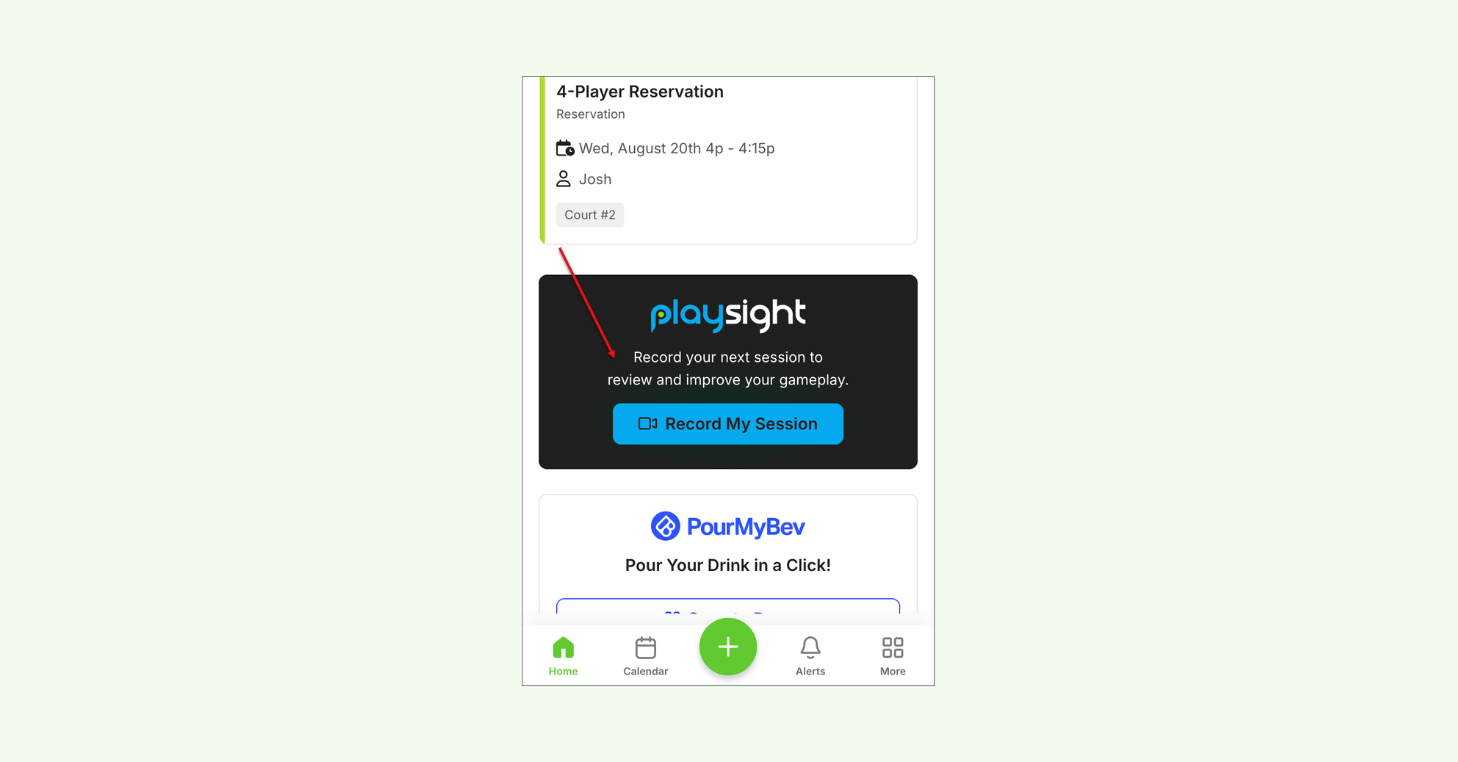
Public Signing Link (Guest Waiver Kiosk): Let guests sign waivers before they show up
The best check-in experience is one your guests don’t have to think about.
The Guest Waiver Kiosk now includes a Public Signing Link, a shareable URL that clubs can send to guests before they arrive. This way, check-ins stay fast and friction-free.
How it works
- Enable Public Signing and generate a shareable waiver link automatically.
- Send the link directly to guests ahead of their visit, or display it as a QR code.
- Guests can complete waivers from anywhere, not just on an in-club kiosk.
- Reduces check-in congestion and simplifies guest waiver collection.
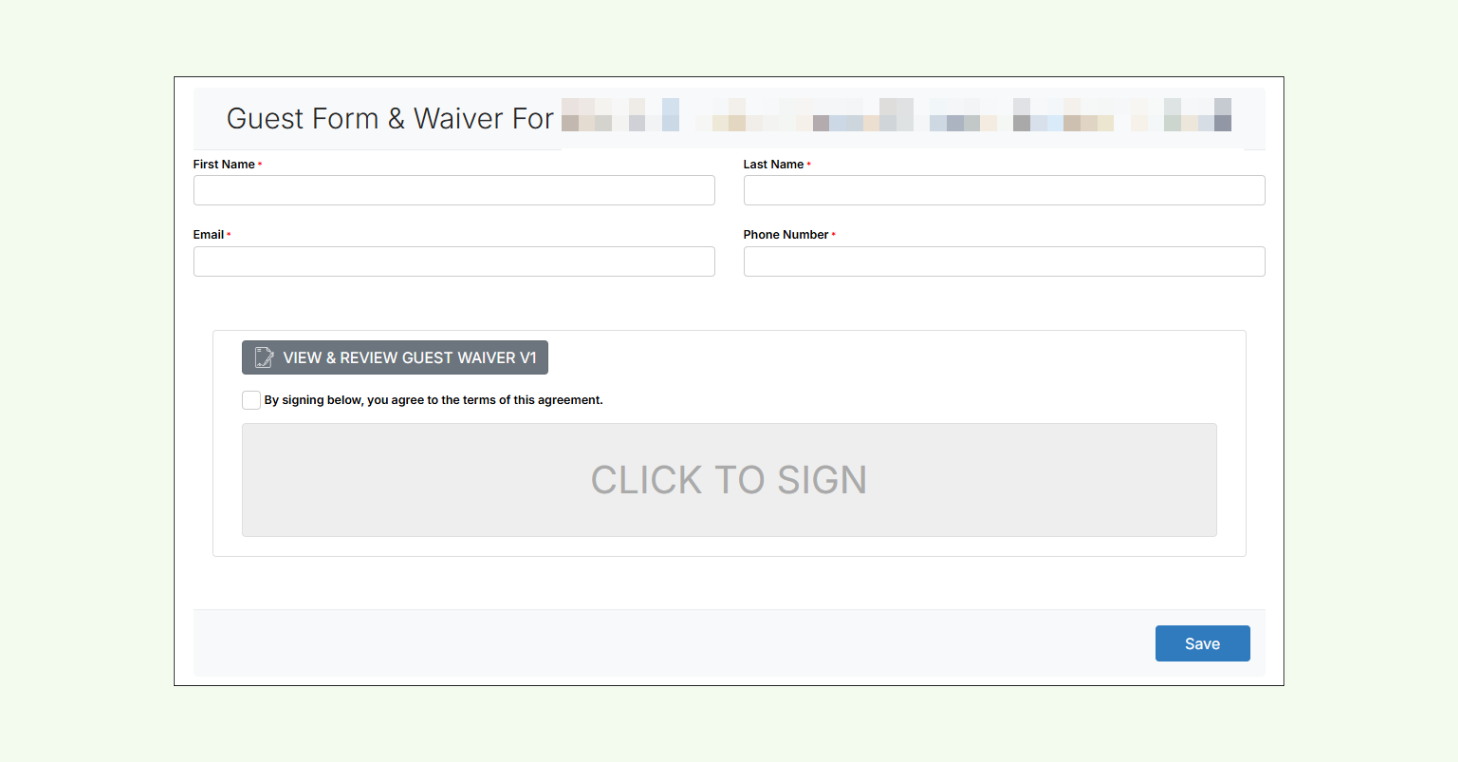
Message History Tab: Review member communication, at a glance
No more digging through reports. View every touchpoint right on a member’s profile.
The new Message History Tab delivers a unified view of every email, text, and push notification sent to a member and their assigned family members. So, you can quickly see exactly what was sent, when, and to whom.
How it works
- Logs every bulk message and system notification sent to a member (email, text, and push) in one view.
- Communication history extends to assigned family members, not just the primary account holder.
- Quickly track outreach, verify delivery, and resolve member questions without digging through multiple reports.
- Creates a built-in communication audit trail across every member profile.
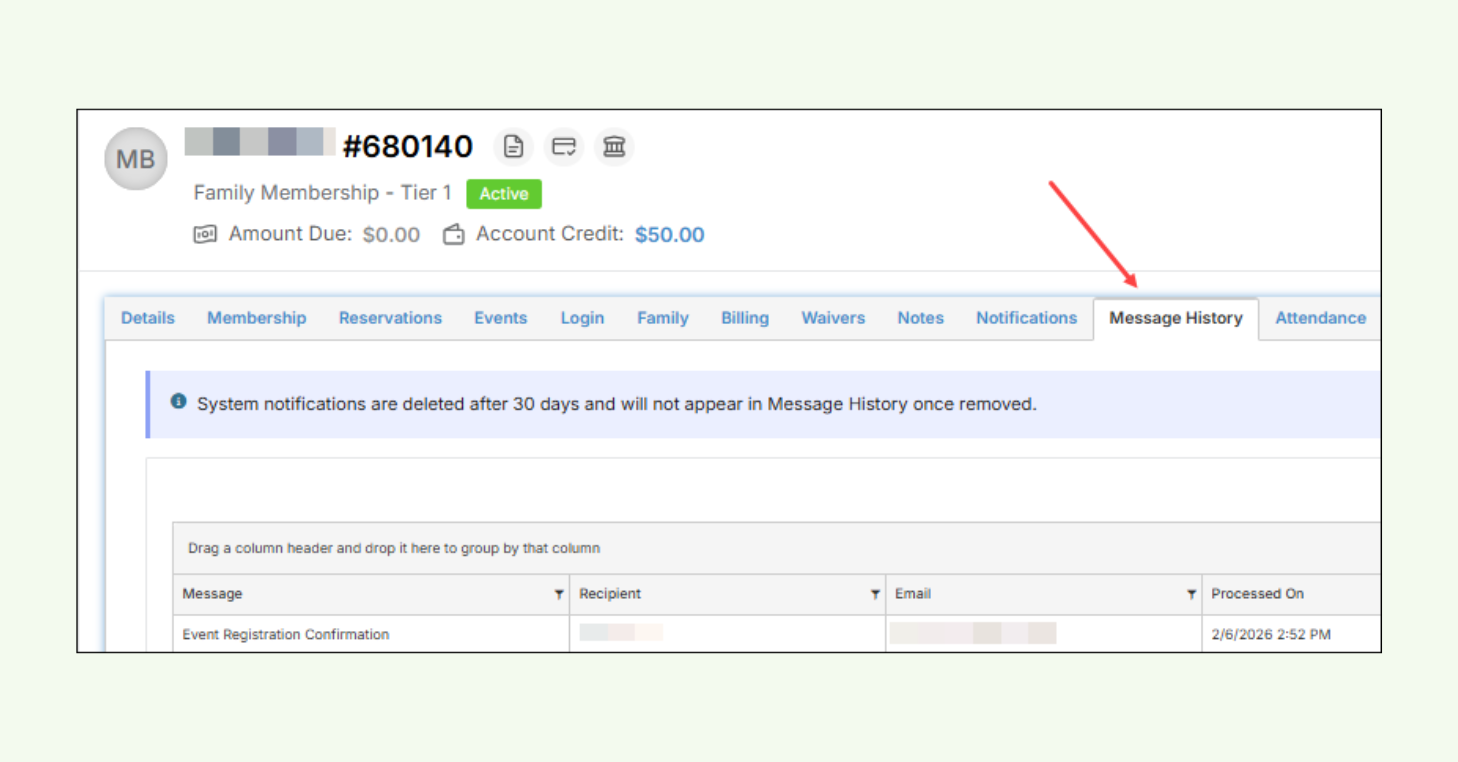
Organization Information: Manage your club’s key details in one place
Your club’s most important details now have a dedicated home.
The new Organization Information page centralizes your club’s contact information, addresses, account ownership, and administrative contacts. This way, CourtReserve always has accurate data to power communications, billing, and public-facing pages.
How it works
- Manage your club’s name, phone number, email, and physical address all from one page under Organization Settings.
- A Google-validated address ensures your club’s location data is accurate across CourtReserve and public-facing pages.
- Designate an Account Owner to receive critical system notices and manage overall account responsibility.
- Add additional contacts so key staff stay informed, and nothing relies on a single point of contact.
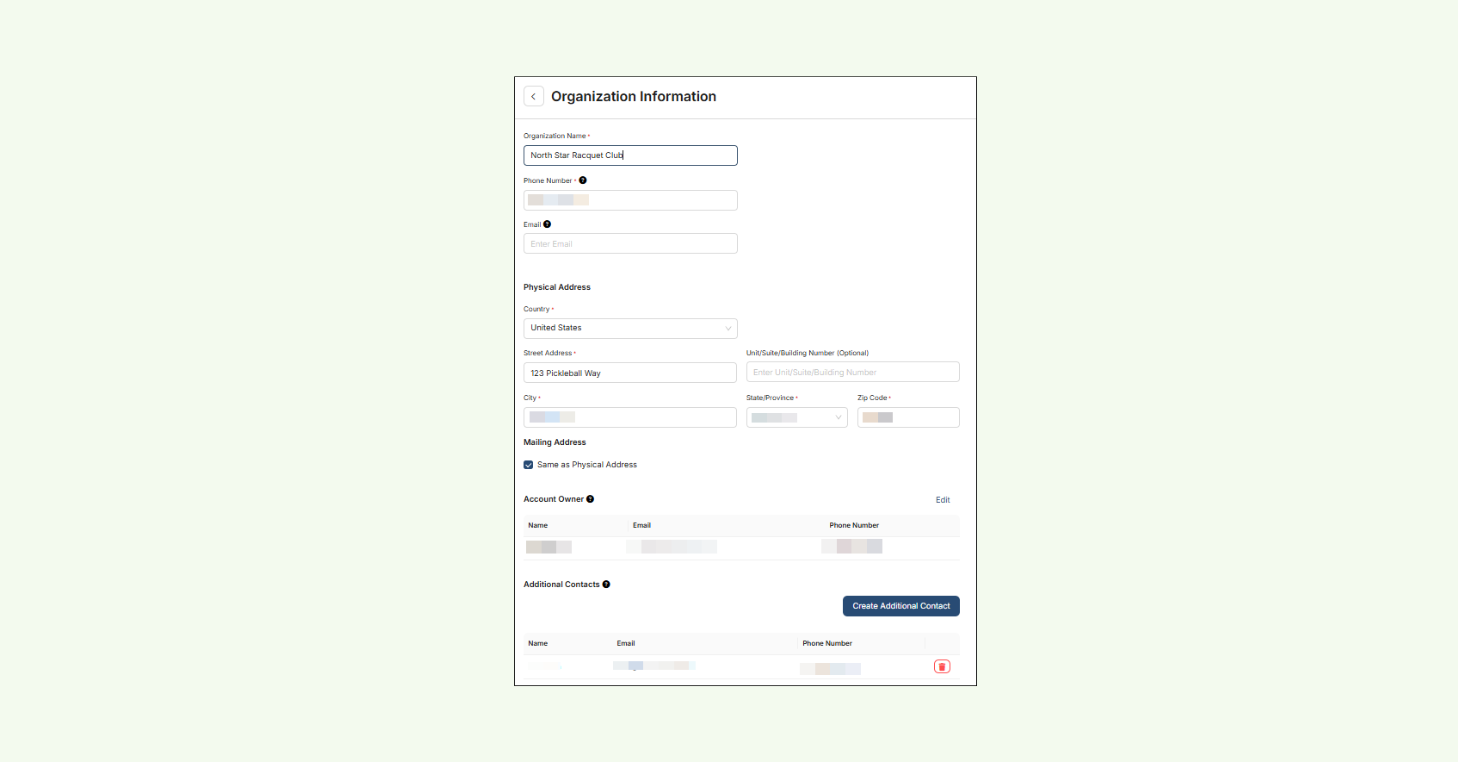
More CourtReserve updates from Q1 2026
Q1 2026 included a focused set of enhancements across reporting, operations, and Public Booking. Each one is designed to save time, reduce manual work, and give your team more clarity.
Here’s a look at what else shipped this quarter:
- Public Booking: Event Support Expanded: Team registration events and event waitlists are now supported in the Public Booking flow, giving clubs more ways to fill programming and capture demand.
- Public Booking: Hide Check-In Code Setting: Lets clubs require front desk check-in instead of self-scanning for control over the arrival experience.
- Public Booking: Indicator Added to Sales Summary Reports: Identify Public Booking transactions with a (P) icon, so you can quickly separate member vs. public revenue.
- Public Booking: Booking Window Rules Now Apply: Public Booking now follows existing Booking Window restrictions based on the assigned membership, keeping off-limit days and times hidden from public users.
- API & Integrations Updates: Several updates improve security, control, and reliability across API access and integrations.
- Membership Auto-Payments: Billing Processing Improvements: Renewals now process more efficiently, so members maintain uninterrupted access and admins spend less time resolving billing issues.
- Waivers Report: Full Name Column Added: Quickly identify participants and review waiver records without cross-referencing multiple fields.
- Enhanced Event Summary Report Accuracy: Team event logic is now factored into player counts, giving admins more accurate participation numbers without manual adjustments.
- Membership Type Added to Cancellations Report: See which membership segments are driving cancellations, helping you make informed decisions around retention and engagement.
- Aged Fees Report – Service Date Calculation Option: Calculate aged fees by Transaction Date or Service Date for more flexible and accurate financial aging analysis.
- Create Member Groups from Members Report: Generate a Static Member Group directly from a filtered Members Report for faster segmentation and targeted communication.
- Confirmation Modal When Creating a Closure: See total affected bookings and players before confirming a closure, reducing the risk of accidental cancellations.
The best is still ahead
This release brought some of our most impactful updates to date — and we’re not slowing down. We’re committed to keep building, listening, and delivering tools that help your club grow.
The best is still ahead, and we can’t wait to share what’s next.
Thanks for growing with us!
Read the full release notes to see everything that shipped this quarter.