At CourtReserve, our goal is simple: bring the best tools in the industry into one connected platform. We believe the best-run racquet and paddle clubs are built on purpose-built tools — each one exceptional at its job, all connected in one place. PlaySight is the latest addition to that ecosystem and serves as the only all-in-one video and analytic platform in the market.
Instead of using one platform that tries to do everything, forward-thinking operators are building flexible, open tech stacks: choosing the best tool for each job and connecting them together.
PlaySight is a perfect example of that thinking in action. It’s purpose-built for AI-powered on-court video and analytics — and now it’s integrated with CourtReserve. This way, racquet sports clubs can offer a performance-focused experience without adding complexity to operations.
Video Transcript
0:011 secondHi everyone, it’s Ashley from Court Reserve. Happy Thursday. It is a Spark webinar day. We are so excited to have
0:088 secondsour uh integrations team with us again because we are doing so many new integrations at Court Reserve. So today is all about Playsite and we’re super excited about that. But of course,
0:1919 secondsbefore we get started, you got to know Columbus next week is going to be hot.
0:2323 secondsAnd I know that both of my friends, Josh and Ryan, will be at the Catalyst event in Columbus. You can still sign up. We
0:3131 secondsdo still have a couple of seats left. Um it’s next Wednesday and Thursday in Columbus, Ohio. First, we’re going to Match Point and do a whole afternoon of
0:3939 secondsroundts, best practice sessions, and then the next day is full-on teaching and court reserve. And plus, you get to come hang out with me and Josh and Ryan.
0:4646 secondsSo, you can still go out today, sign up,
0:4848 secondsum, courtresveerve.comcatalyst webeinars. And then don’t forget the next club pickleball mastermind is in June. If you want to learn about the
0:5757 secondspickleball business, there is no better place to go do it than with club mastermind. Um, and Utah in June. Where else would you want to go in my opinion?
1:061 minute, 6 secondsUm, and then I want to call your attention to in two weeks we have our next courtside conversation. It’s all about best practices for public
1:151 minute, 15 secondsfacilities. So, we’re going to have a tennis and a pickle ball um all about how they’re running their facility. Um
1:221 minute, 22 secondsand so, you can go out to our courtserve.com/webinar and sign up. It’s on April 28th. Um and
1:291 minute, 29 secondsthe last one, it was incredible. We just had so much great conversation. I think it was really good for folks. So, Josh and Ryan, I’m going to turn it over to
1:371 minute, 37 secondsyou guys. Let’s talk about video recording.
1:411 minute, 41 secondsAwesome. Yeah. So today we are going to be highlighting one of our new integrations. Um and this is going to be our second video recording provider that
1:491 minute, 49 secondswe are integrated with and that is going to be playsite. Um before we go over the actual integration, I do want to touch
1:571 minute, 57 secondson something that we had brought up in our integrations overview um integration that we had or webinar that we had. And
2:052 minutes, 5 secondswith that is just kind of our thought process when we’re thinking of new integration partners. Um, we think it’s
2:122 minutes, 12 secondsimportant to provide more than one provider in a space or in a service. So that way customers are going to have the
2:192 minutes, 19 secondsability to pick and choose which provider works best based on their specific needs. So we’re also looking for different providers that are going
2:282 minutes, 28 secondsto have some unique aspects to the service that they provide. That way um we are, you know, giving different
2:352 minutes, 35 secondsoptions for the customers. Ashley, it looks like you’re still sharing your screen. Just wanted to let you know about that.
2:422 minutes, 42 secondsAwesome. All right, Ren, I’m not sure if there’s anything else that you wanted to add there before we actually start diving into the integration.
2:492 minutes, 49 secondsYeah. No, I I mean, I think Josh nailed it there. You know, the goal here for us is to offer, you know, uh a couple options within categories and and Playsite certainly allows us to do that.
3:013 minutes, 1 secondUm, you know, with their video, their AI AI analytics and performance highlights.
3:073 minutes, 7 secondsSo, it’s a it’s a unique offering. It’s an industry leader. Um, and we’re extremely excited to have them on the platform.
3:153 minutes, 15 secondsFor sure. Yeah. Yeah. And also, one thing to touch on before we get on to the actual integration is just some of the general benefits for, you know,
3:243 minutes, 24 secondsproviding that video recording service to your customers. Um, you know, this is a great way to have an additional stream of revenue for your facility. Um, you
3:333 minutes, 33 secondsknow, when you’re setting up the integration, you will be able to choose recording costs, and you can also do that by specific membership types. So,
3:403 minutes, 40 secondsif this is something that you maybe want to offer at a at a cheaper rate for your premium membership or maybe for free for your premium membership, but maybe then
3:493 minutes, 49 secondscharge certain amount per hour for your guest or your non-members, you know,
3:543 minutes, 54 secondsthat’s an option that you’ll be able to have whenever you’re using one of these video recording integrations.
4:004 minutesSo, let me share my screen here. I’m going to jump into Court Reserve and actually kind of go over the integration setup process. Um, what may be required
4:094 minutes, 9 secondsfrom your end before you get that integration up and running. And then lastly, I’m going to touch on the player experience and the actual flow for a
4:184 minutes, 18 secondsplayer to initiate a recording through Core Reserve. So, let me share my screen here.
4:264 minutes, 26 secondsAwesome. Great. All right. So the first thing I’ll go over is how we can enable this integration and the things that you will need to do prior to actually
4:344 minutes, 34 secondsutilizing the integration. So if you have not started using Playate already or have not already talked to their team, the first thing that I will point
4:434 minutes, 43 secondsout is we do have a sales request form in our knowledgebased article that’s going to be right up here. And that form
4:514 minutes, 51 secondsonce you fill out that information is going to go straight to play site sales team. So once you fill out that form,
4:574 minutes, 57 secondsthey will get all of your information and they will reach out to you and begin learning more about your wants and needs and eventually starting that onboarding process.
5:065 minutes, 6 secondsThe other thing that you will want to do once you have been onboarded with Playsite is you will have to sign our disclaimer in order to use the
5:135 minutes, 13 secondsintegration in court reserve. So if you haven’t signed that disclaimer yet,
5:185 minutes, 18 secondsnope, looks like I got signed out. One second here.
5:235 minutes, 23 secondsSo, if you haven’t signed that disclaimer yet and you try enabling the integration and going to the video recording setup page, you know, once we
5:325 minutes, 32 secondsgo to the additional features page and once we go to the video recording option here, you are going to be met
5:415 minutes, 41 secondswith a page that’s letting you know that you should reach out to our support team if you are interested in integrating with Save My Play or Play Site. So, if
5:495 minutes, 49 secondsyou see this, that means that you have not yet signed that disclaimer. So, if you have not, feel free to reach out to our support team. They’ll make sure that you get that disclaimer and can sign it.
5:595 minutes, 59 secondsAnd then once our support team has gotten that signed disclaimer, they will then give you access to the integration.
6:066 minutes, 6 secondsSo, now let me jump over to my organization that does have access and we can start going over what that setup process is going to look like for the play site integration.
6:176 minutes, 17 secondsSo, as I showed a little bit earlier,
6:196 minutes, 19 secondsum, in order to get to this page, we can go to settings on the sidebar.
6:246 minutes, 24 secondsWe want to scroll down to the bottom additional features row. And on that additional features page, we are going
6:306 minutes, 30 secondsto see the video recording integration option. So, once we have checked that there and we go to the setup page, the
6:396 minutes, 39 secondsfirst thing that you’ll want to do is you’ll want to choose which provider you’re going to be integrating with. So in this case, we’re going to be selecting play site. And then from
6:486 minutes, 48 secondsthere, there’s going to be three fields that we need to fill in in order to validate your play site account. It’s going to be the username and the
6:566 minutes, 56 secondspassword to your login for the play site portal. So this won’t be your court reserve login. This will be your login to get into the play site admin portal.
7:067 minutes, 6 secondsAnd the last thing that we’ll need is your facility ID from plays site. This should be provided to you during the onboarding process with Playsite. But if you have not received your facility ID,
7:187 minutes, 18 secondsyou can always reach out to PlaySite support team and they can provide that for you. If you’re already talking with our support team, feel free to let them
7:267 minutes, 26 secondsknow that you don’t have your facility ID from PlaySite. We can always CC their support team and make sure that you get that facility ID so that you can begin using the integration.
7:387 minutes, 38 secondsThe last thing I’ll point out before we actually get into the setup for the integration is this update credentials button. Since we are using the log to
7:467 minutes, 46 secondsthe PlaySite portal, if there ever is a reason that you need to change your password or your email on the PlaySt,
7:547 minutes, 54 secondsyou will want to make sure you update those credentials on this integration setup page as well since we’re using those login credentials to validate your
8:028 minutes, 2 secondsPlaySite account. But once we have those three fields set up there, then we can move on to the actual setup for the
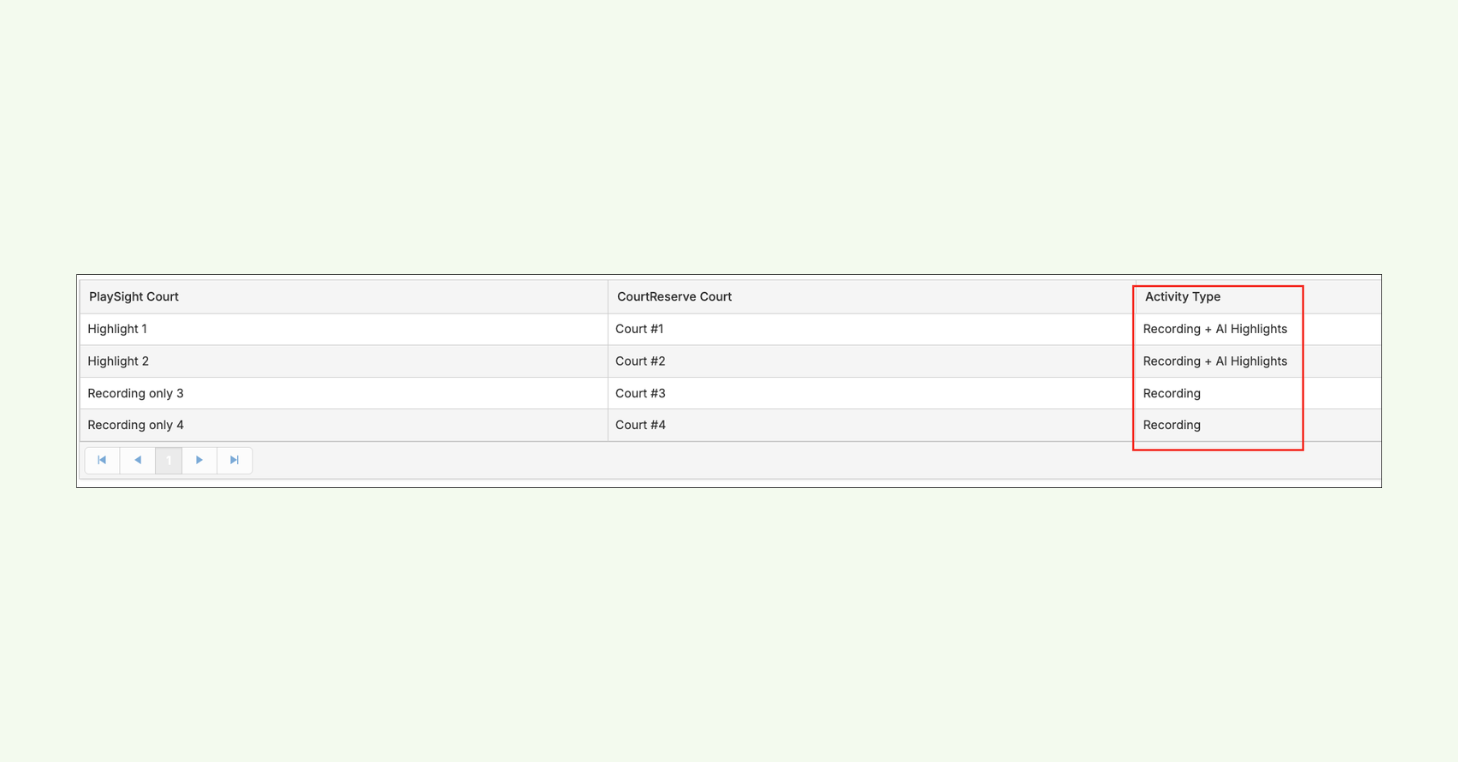
8:108 minutes, 10 secondsintegration. So the first thing that we’re going to see is we’re going to see a list of all of our courts inside of play site. And the first thing we’ll
8:188 minutes, 18 secondswant to do is map the court reserve court to the play site court. So in this case, we can hit the edit button and
8:268 minutes, 26 secondswe’ll just want to select which court reserve court should be mapped with this specific play site court.
8:328 minutes, 32 secondsThe other column that we’re going to see here is activity type. So if this is a smart court and there is the ability for AI highlights on this specific court
8:418 minutes, 41 secondshere, we are going to be reading that information from play site side. So you will be able to easily find which specific courts can have the AI highlight selected as a recording type.
8:548 minutes, 54 secondsSo this is going to become an additional option that players would be able to select from when they’re initiating that recording. They’ll be able to do just a
9:039 minutes, 3 secondsunedited recording with no analytics or highlights or they can choose the AI highlights option which will give them
9:109 minutes, 10 secondsall of those stats, analytics and highlights after their recording has been processed. And this kind of ties into one of the differences between save
9:199 minutes, 19 secondsmy play and play site. So with Save My Play, the two recording types are going to be full, which is just an unedited recording, and then a condensed
9:289 minutes, 28 secondsrecording, which is going to use AI to cut out all of the dead time in that recording. Whereas with Play Site, their
9:359 minutes, 35 secondsAI option is going to be an AI highlights that give you some stats,
9:399 minutes, 39 secondssome highlights, um, and things like that whenever that recording has been processed.
9:459 minutes, 45 secondsSo after we have actually mapped our courts with the play site courts from court reserve, the next setting we would
9:529 minutes, 52 secondsbe able to use here is the eligible to opt in for recording. So when we check this setting here, this is going to be
9:599 minutes, 59 secondswhat makes Play site visible for members on the mobile app. And I’ll go over the player experience after the setup page.
10:0710 minutes, 7 secondsSo that way we can actually look at what the player would experience after the integration is up and running.
10:1410 minutes, 14 secondsBut after we check off this setting here, there’s going to be some additional optional settings that we can set up here if we would like to um just
10:2110 minutes, 21 secondsdepending on how we want this integration to work at our facility. So the first thing that I’ll point out is the show to following memberships dropdown.
10:3110 minutes, 31 secondsThis allows us to pick and choose which memberships will actually have access to initiating a play site recording from
10:3810 minutes, 38 secondsthe mobile app. So, if we only want to offer this maybe to our paid memberships, but we don’t want to give guests or non-members access to actually
10:4710 minutes, 47 secondsinitiating a recording, we would be able to do that from here. But another way that we could set this up is maybe we do
10:5510 minutes, 55 secondswant to offer this to all of our different membership types, but we want our recording costs to differ based on the specific membership type the player
11:0311 minutes, 3 secondshas. We would also be able to do that as well. So, in this little call out right here, you’ll see that recording cost can
11:1011 minutes, 10 secondsbe set up under booking settings on the cost page. And we do have a little shortcut that will take you right there.
11:1811 minutes, 18 secondsSo, when we get to booking settings,
11:2011 minutes, 20 secondscosts, and then court costs, once we have a video recording integration enabled for this facility, we’re going
11:2811 minutes, 28 secondsto have a new section all the way on the bottom of this page where we can set up our recording costs. And just like our court cost, we would be able to set these up by specific membership types.
11:3911 minutes, 39 secondsSo again, if we want to go in and we want to say our premium membership has a lower hourly rate versus our guest membership, we would be able to do that.
11:4911 minutes, 49 secondsI have also seen an example where a facility has set up a membership that is basically just like their premium
11:5711 minutes, 57 secondsmembership, but then it also has unlimited play site access. So in that case, you know, we could set up a different membership for this unlimited
12:0512 minutes, 5 secondsplay site access membership and then we can make the recording cost zero and and maybe we just want to set up the the actual membership price to sort of consider the unlimited play site access.
12:1712 minutes, 17 secondsSo that that is a route that we could go here um when thinking about the structure and how we want to price and offer the play site integration.
12:2812 minutes, 28 secondsSo from there once we have chosen the membership types that we want to allow access to play site and once we have set
12:3512 minutes, 35 secondsup our recording costs we have a few more settings on the setup page. So next we can choose if there should be a tax rate associated with any fee that gets
12:4412 minutes, 44 secondsgenerated from play site recordings and then the next one is going to be revenue categories. So something I will point
12:5312 minutes, 53 secondsout here is whenever there is a fee generated from a play site recording, it is going to generate as a miscellaneous
13:0113 minutes, 1 secondfee on the player’s account. So if you actually want your recording cost to go into a specific bucket that you can filter from on your financial reporting,
13:1113 minutes, 11 secondsyou could go in here and you could create a recordings revenue category. So that way any play site fee that gets
13:1913 minutes, 19 secondsgenerated in your facility is going to fall into this specific revenue category bucket. And that way you can easily
13:2613 minutes, 26 secondsfilter and find reporting specifically on your revenue categories um for recordings.
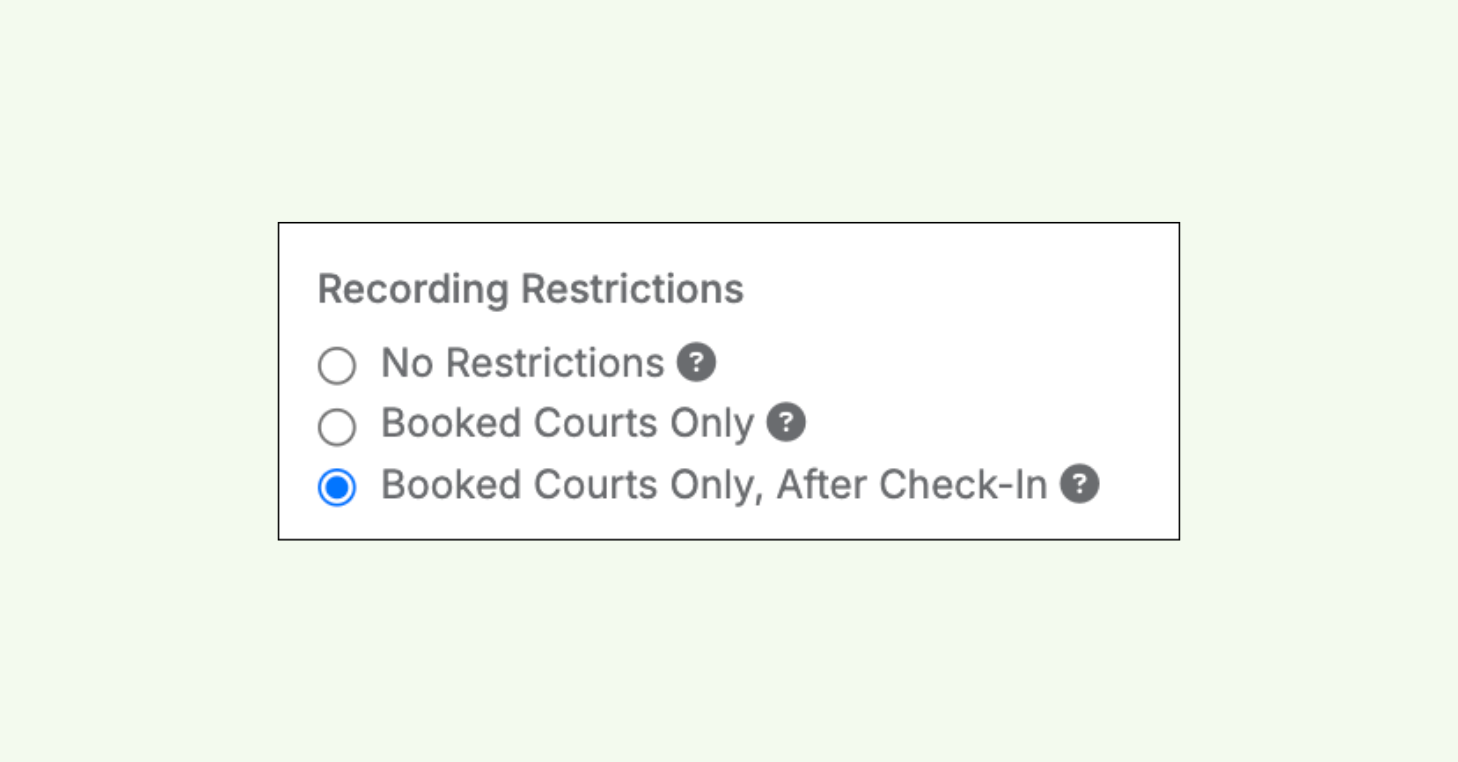
13:3413 minutes, 34 secondsThe last thing I’ll touch on here is the recording restrictions, which I think is a pretty essential setting here to consider. So, these recording
13:4313 minutes, 43 secondsrestrictions are going to allow us to decide when a player can and can’t record specific courts at your facility.
13:5013 minutes, 50 secondsSo, first setting here is no restrictions. They’re able to record any courts at any time. But the second option here is going to be booked courts
13:5913 minutes, 59 secondsonly. This means that a player is only going to be able to record that specific court or courts if they have a
14:0714 minutes, 7 secondsreservation or an event or a league registration on that specific court. So,
14:1214 minutes, 12 secondsif we do want to make sure that players are only recording the courts that they actually have a booking or a registration on, this is a great option.
14:2114 minutes, 21 secondsUm, but we do also have a restriction that kind of takes that another step forward. So, we have booked courts only
14:2814 minutes, 28 secondsafter check-in. So, if we have front desk staff that is manually updating the check-in statuses for a player when they
14:3514 minutes, 35 secondsenter the facility or if we have a selfcheck-in kiosk set up at our facility that a player’s always going to be scanning when they enter, we can use
14:4414 minutes, 44 secondsthis restriction and we can say players can only record on courts that they have a reservation on. And then on top of that, they can
14:5314 minutes, 53 secondsonly initiate that recording after they have checked into the facility for that specific reservation or that specific registration that is on their account.
15:0515 minutes, 5 secondsSo that’s going to be the setup here for the integration. Once we have eligible to opt in for recording checked, that
15:1215 minutes, 12 secondsmeans the play site row is going to be visible on the mobile app homepage for your players. And then of course if we want to sort of limit who can use this
15:2115 minutes, 21 secondsintegration um we can choose which memberships it will show for. And then of course if we want to set up our recording cost to differ by membership
15:2915 minutes, 29 secondstype we would be able to do that as well.
15:3315 minutes, 33 secondsBefore I move over to the player experience, is there any questions in the Q&A or in the chat that I can touch on?
15:4215 minutes, 42 secondsJosh, we we do have one from Jeff. Um we could probably hold this off to the end.
15:4715 minutes, 47 secondsUm but uh I can throw it out to you if you want. Yeah. Yeah, sure. We can go over it.
15:5315 minutes, 53 secondsJeff was asking um if we could pro provide some examples of uh pricing structures at other clubs and then was
16:0016 minutesalso asking about uh a list of play site clubs to reach out to to learn uh kind of best practices for their facilities.
16:0816 minutes, 8 secondsYeah, that’s a great call out. So in terms of the list of clubs that are using play site, I can definitely check on our end after the webinar if we have
16:1616 minutes, 16 secondsany reference clubs that they could reach out to. If not, we can definitely work on getting that reference list just so that you can talk to those
16:2316 minutes, 23 secondsfacilities. Um, in terms of the different pricing structures that I’ve seen, um, I’ve really seen a large
16:3116 minutes, 31 secondsspectrum of how people are utilizing the video recording integration. So, I’ve seen facilities that are, you know, just
16:3816 minutes, 38 secondsnot charging anything additional for the video recordings at all. Um, I think a more common one and probably the most
16:4616 minutes, 46 secondscommon one that I’ve seen is it’s available to all of the memberships, but we’re just sort of setting up the recording cost to differ based on if the
16:5416 minutes, 54 secondsplayer has a paid membership or a free membership. Now, in terms of the actual cost and hourly rate, I have seen a
17:0317 minutes, 3 secondsdecent range there. probably depends on the demographic and where you’re located. Um, I’ve seen it differ from anything from $3 an hour to $8 an hour.
17:1417 minutes, 14 seconds$8 is kind of the highest that I’ve heard, but typically I see it kind of ranging from $3 to $5 an hour.
17:2117 minutes, 21 secondsYeah, very very market dependent I would say. Um, we have one more question from Eric and he was just asking if the cost
17:2817 minutes, 28 secondswas set up per player per court. um which I believe is is also um something that a facility can choose, right?
17:3817 minutes, 38 secondsYeah. So, right now the cost is really going to be by membership type. Um we don’t have it set up so that you can have different pricing for each specific
17:4717 minutes, 47 secondscourt that is available. Um right now it’s just based on the membership type that’s on the player’s account when they initiate that recording.
17:5417 minutes, 54 secondsPerfect.
17:5617 minutes, 56 secondsAwesome. All right. So, if there’s no other questions, I can jump over to the player side, just kind of walk through what the player experience would be for this integration.
18:0818 minutes, 8 secondsSo, right now I’m on the member side of the mobile app. And whenever we have one of these video recording integrations
18:1618 minutes, 16 secondsenabled and after we have checked that players are eligible to opt in for recordings from the mobile app, when we
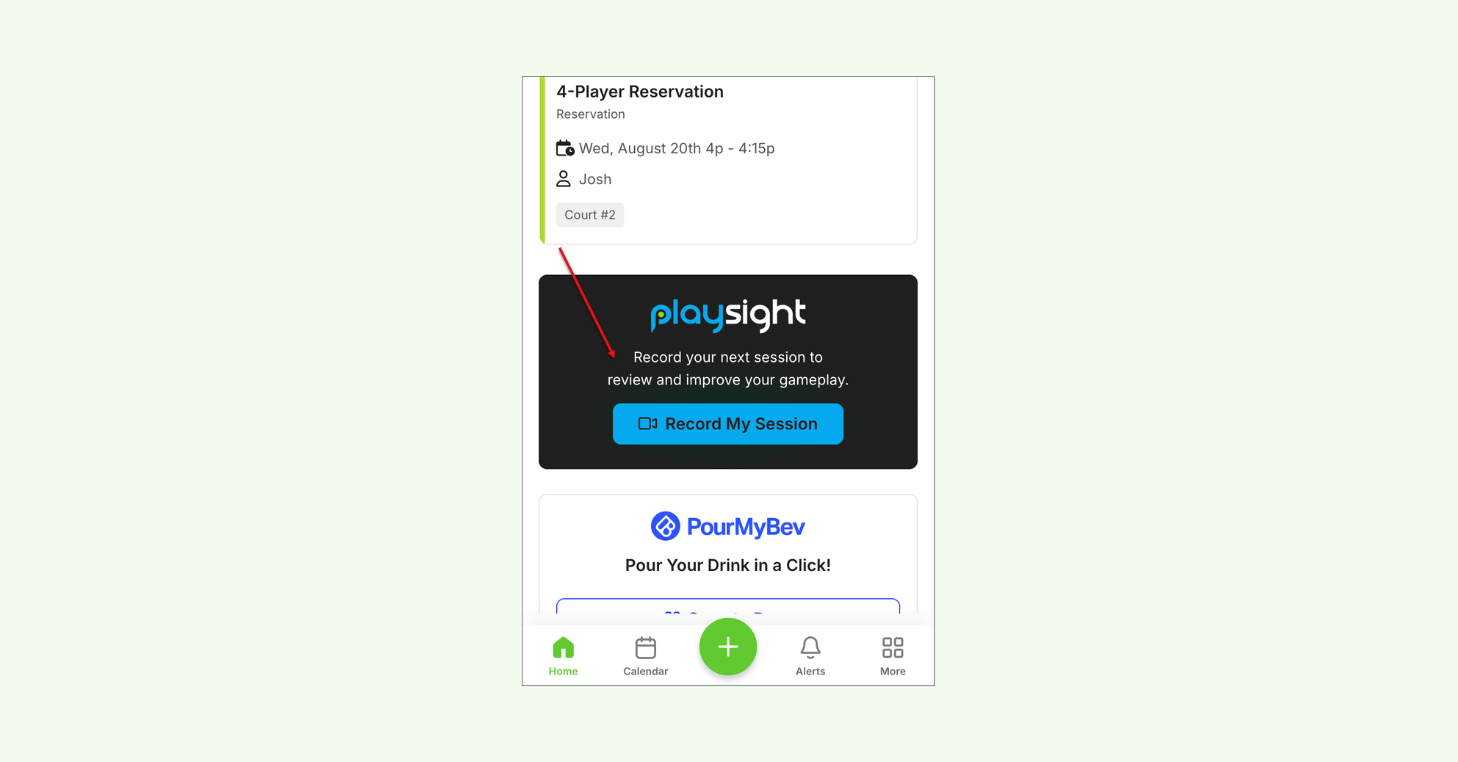
18:2318 minutes, 23 secondsscroll down right under the my booking section, we’re going to have a new row here. And that row in this case is going
18:3018 minutes, 30 secondsto be specific to play site. And there’s going to be this record my session button. So this is going to be where players can go in to initiate a recording on their account.
18:4118 minutes, 41 secondsNow, when we click on record my session,
18:4418 minutes, 44 secondsthat’s when we get to the start recording page. So, this is going to be where those recording restrictions start to come into play. So, in this test case
18:5318 minutes, 53 secondsfor this webinar, I have no restrictions right now. I can record any of the courts in this facility. But if I had booked courts only as my restriction and I had a reservation on tennis court 2,
19:0519 minutes, 5 secondsfor example, if that’s the only court that I’m able to record, it’s just going to be pre-selected in this field right here. Um, and if I tried to open this
19:1419 minutes, 14 secondsdropdown, you know, I’m not going to be able to pick from any other courts since I don’t have a recording or since I don’t have a reservation or a registration on that court.
19:2519 minutes, 25 secondsThe next thing we’re going to be selecting here is the duration. Um,
19:2819 minutes, 28 secondsright now we do have one and twohour durations as the available options. I have gotten some feedback into opening
19:3619 minutes, 36 secondsthis up and making it a little bit um allowing that range to be a little bit more specific to the facility. So maybe setting up some different intervals,
19:4619 minutes, 46 secondsmaybe allowing the duration to go beyond two hours. So we have been listening to that feedback. Um, but after we have set
19:5319 minutes, 53 secondsup the court and the duration time, the last thing that we’re going to be selecting here is the recording type.
19:5919 minutes, 59 secondsAnd this is going to be where those different activity types that show on the integration setup page start to come into play. So for play site, we’re of
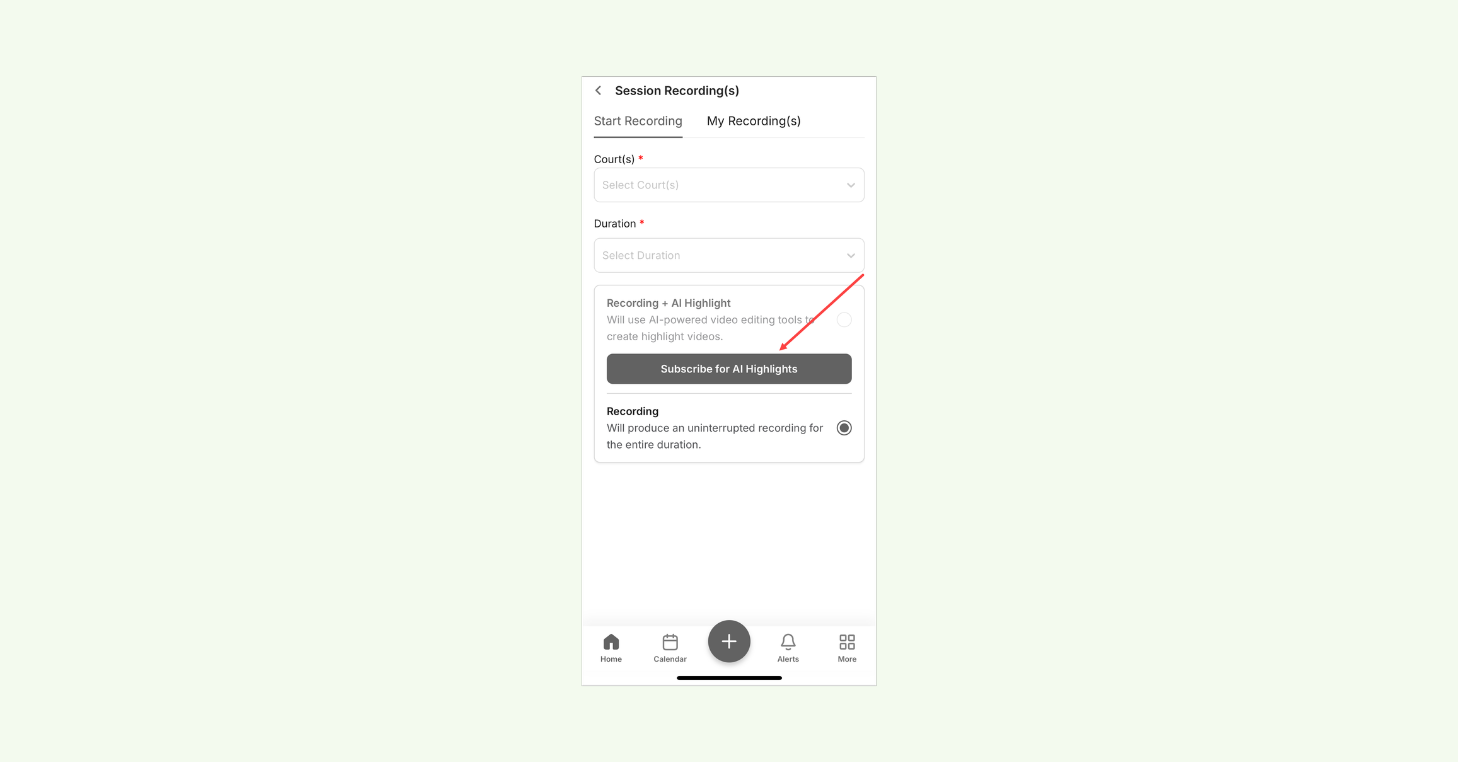
20:0820 minutes, 8 secondscourse going to have this uninterrupted recording option, but we’re also going to have this recording plus AI highlights option. Now with Playsite,
20:1720 minutes, 17 secondshow this AI highlight recording type works is the player would need to subscribe to the AI highlights in order
20:2520 minutes, 25 secondsto utilize this recording type. And the subscription pricing is going to be something that you would set up on play
20:3320 minutes, 33 secondssites portal. But once you have set up the subscription for AI Highlights, if the player is already subscribed, if if
20:4120 minutes, 41 secondsthe email address they have in court reserve is found in PlaySite and we know that they’re subscribed, they’re going to immediately be able to choose this
20:4920 minutes, 49 secondsrecording type. But in the case where they have not yet subscribed, they’re going to get this button here that would allow them to actually go through the payment process for the subscription.
21:0121 minutes, 1 secondSo, as you can see here, I can choose the monthly or the yearly subscription,
21:0521 minutes, 5 secondsthe $2 or $3 pricing. That’s just the pricing that I have set up in my PlaySite test account for these subscriptions. Um, and then from there,
21:1421 minutes, 14 secondsthe player can go through this checkout process to then have an active subscription for the AI highlights.
21:2221 minutes, 22 secondsIn this case, I’m not going to go through with that checkout process. So I will be brought back to the option just to subscribe.
21:3021 minutes, 30 secondsBut from here if I did successfully subscribe I would be able to just go ahead and pick that recording type option.
21:3821 minutes, 38 secondsSo from here, once I’ve picked my court,
21:4021 minutes, 40 secondsmy duration, my recording type, once I hit confirm here, I’m then going to be brought to this recording in process
21:4821 minutes, 48 secondspage progress page where I can see any court that I have a recording on and I can also see the time that is remaining
21:5621 minutes, 56 secondsfor the recording on that specific court.
22:0122 minutes, 1 secondIf I do have access to recording additional courts, we do also have a start another recording button here.
22:0822 minutes, 8 secondsThis will allow me to pick from any of those other courts I have access to that I have not yet started a recording on.
22:1622 minutes, 16 secondsIn this case here, this is a court type that does not allow the AI highlights.
22:2122 minutes, 21 secondsSo, I’m not going to be able to pick from that recording type when I initiate this recording. But once I hit confirm,
22:2922 minutes, 29 secondsI’m then going to be able to see two recordings in progress. One for tennis court 2, one for tennis court 3. And we
22:3722 minutes, 37 secondscan see that the time remaining is differing based on when I initiated that recording.
22:4322 minutes, 43 secondsSo I’ll go ahead and cancel these recordings a little bit early on my side just so we can jump over to the my recording tab.
22:5322 minutes, 53 secondsSo after I have initiated a recording from plays site through the court reserve app and once that recording has
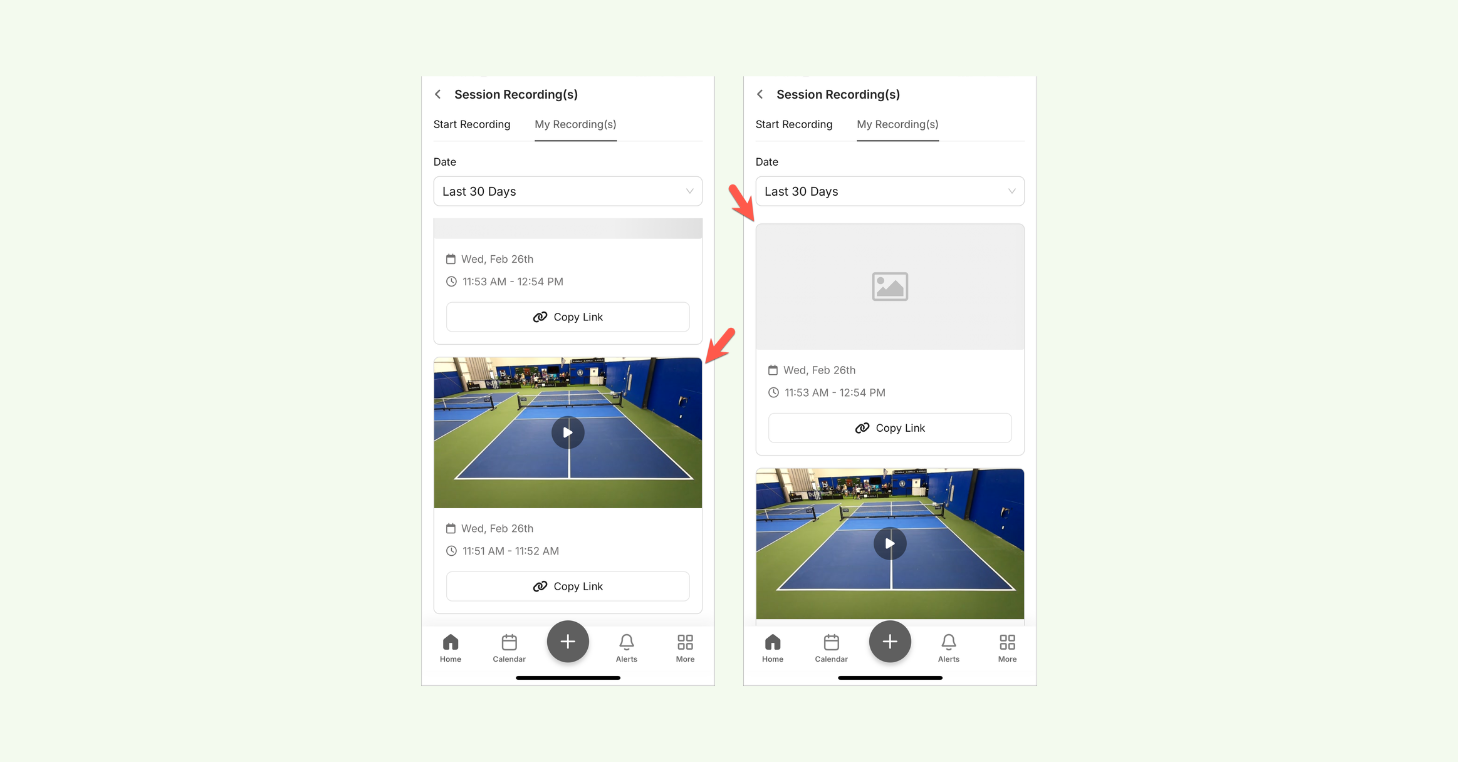
23:0023 minutesprocessed we’re going to have this my recordings tab right here and this is going to be where I can see any recording that has processed under my account through the court reserve app.
23:1023 minutes, 10 secondsSo this is going to be where I can start to see any recordings that I maybe have processing or any recordings that have
23:1723 minutes, 17 secondsalready processed and gone to my play site account. So, in this case, if I click on the thumbnail right here,
23:2423 minutes, 24 secondsthat’s going to bring me to the play site URL where I can see this specific recording. Um, and then if I have those AI highlights enabled for this specific
23:3323 minutes, 33 secondsrecording, that’s going to be when the player can start to actually see those statistics and those highlights that came from this recording that they initiated from court reserve.
23:4523 minutes, 45 secondsAnd for right now, that’s really about the flow for the player. So, it’s pretty simple. They just go to their homepage.
23:5223 minutes, 52 secondsThey can click that record my session button. And then from here, they’re just picking the court, the duration, and the recording type that they want to choose
24:0024 minutesfrom. After they have initiated that recording, after it’s ended, and after it’s processed, they would be able to then find those recordings on the my
24:0924 minutes, 9 secondsrecordings tab. And then from there, if they wanted to actually take a look at this recording, um, they just need to click that thumbnail, they’d be brought
24:1724 minutes, 17 secondsover to the PlaySt URL. Or if they wanted to copy the link and share this video somewhere, they’d be able to do that as well.
24:2524 minutes, 25 secondsAwesome. So, the last things that I’ll go over kind of jump back to the admin side, just kind of showing you how the fees show up on the player account, and
24:3324 minutes, 33 secondsthen also going over our recording report that we have. Um, before I do that, were there any questions? I think I saw something pop up in the chat.
24:4124 minutes, 41 secondsYeah, we we actually have a followup from Eric Oakland from earlier, but that also leads into Jeff’s uh question that just popped in as well. So question is,
24:5224 minutes, 52 secondswhat if four people play but only one booked it? Can all four get the recording? Um that would that question would pertain to both Eric and Jeff?
25:0225 minutes, 2 secondsGot it. Yeah. So, right now, the recording is only going to send automatically to the player that initiated that recording. Um, this is
25:1025 minutes, 10 secondssomething that we’re looking into as we think about adding the recording flow or the ability to initiate a recording into
25:1925 minutes, 19 secondsthe reservation flow. Um, finding an easy way that we can send it to all of the players that are on that reservation. But for right now, since
25:2625 minutes, 26 secondsthe the recording is not directly linked to a booking, uh we’re only sending it to the person that had initiated that recording.
25:3525 minutes, 35 secondsCool. And then one other one we had from Eric. Um, and this this might not pertain as much, but um, they’re
25:4325 minutes, 43 secondscurrently on the legacy pricing with the new um, membership or yeah, membership pricing tiers. Um, would and they’re currently integrated with uh, Playsite.
25:5525 minutes, 55 secondsWould they need to move to one of those new tiers to continue that integration?
26:0026 minutesAh, yes. And that’s that’s a good thing to call out. Yes. So, you would need to migrate over to one of our new pricing tiers. Um, if you go to courtreserve.com/pricing,
26:1026 minutes, 10 secondsthat will show you all of the current subscription tiers that we have. And if you scroll down, it will show you the integrations that would be available to
26:1826 minutes, 18 secondsyou based on the subscription tier that you picked. So, I would recommend going to that page, finding the tier that works best for you, and just making sure
26:2626 minutes, 26 secondsthat the video recording integration is a possible option for you in that tier.
26:3326 minutes, 33 secondsAnd then Susan just asked uh do we have to pay for play site?
26:3726 minutes, 37 secondsYeah. So there’s there’s definitely going to be some some uh fees from the play site side that are sort of outside
26:4426 minutes, 44 secondsof the integration. So, if you have questions on camera pricing, hardware,
26:5026 minutes, 50 secondsum, or any of those fees that may be associated from the PlaySt, I would definitely recommend filling out that sales request form so that way you can
26:5926 minutes, 59 secondstalk to their sales team and better understanding what pricing would look like for your facility and your needs.
27:0627 minutes, 6 secondsThanks. And one more from Jeff. Um, he’s asking, “How does the AI know which player to provide stats for if they
27:1327 minutes, 13 secondsbooked?” That is a great question. Um I since the integration on our side is more about initiating the recording, I
27:2127 minutes, 21 secondsprobably would not be the best person to answer that question. Um but that is a great question that we can send over to Play Sight’s team and and maybe they can
27:2927 minutes, 29 secondsgive us some insight that we can send back to you. So let me let me keep your name down just so I remember to reach back out to you after we’ve talked to
27:3827 minutes, 38 secondsPlayitight’s team and we’ve gotten some more insight on that.
27:4227 minutes, 42 secondsCool. Awesome. All right. Yeah, I think we have a few questions in the Q&A, but were those the ones that you had Yeah.
27:5027 minutes, 50 secondshad brought up, too? Okay, cool. Awesome.
27:5327 minutes, 53 secondsAll right. Yeah. So, the last two things that I’ll go over are one, what are these fees going to look like on a
28:0128 minutes, 1 secondplayer’s account? Um, and then two, also the recording report that we have that you can use to track the recordings that
28:0828 minutes, 8 secondsare being initiated through your facility through this integration.
28:1328 minutes, 13 secondsSo, the first thing that I’ll show you is what these fees are going to look like on a player’s account.
28:2028 minutes, 20 secondsAs I had mentioned earlier, these are going to be miscellaneous fees that show up on a player’s account. we will have
28:2828 minutes, 28 secondsin the description video recording so you know that this fee was generated from a video recording that they had initiated and from there in the date and
28:3728 minutes, 37 secondstime column we’d also be able to see the total duration that they had recorded for. So let’s say I initiate my
28:4528 minutes, 45 secondsrecording for two hours and I’ve in this case I have $20 an hour for my recordings. If I end my recording early
28:5428 minutes, 54 secondsand my recording actually ended up being an hour or less, the fee amount will update based on the total recording time that that recording ended up being. So,
29:0529 minutes, 5 secondsif I initially recorded or initiated my recording for two hours and I got charged $40, if I end it early, the fee
29:1329 minutes, 13 secondswill update to $20 based on the total recording time that that recording ended up being.
29:2229 minutes, 22 secondsAll right. And then for the last thing I’ll go over is under reports, we do also have a recordings report here. So
29:2929 minutes, 29 secondswe’ll be able to see every recording that was initiated through this integration. And we would be able to see things like fee amount, membership name,
29:3929 minutes, 39 secondsmember name, um recording type that they had picked from, payment status, and we’ll also be able to filter by that on
29:4629 minutes, 46 secondsthis report. So, if we want an easy way to see all of the players that have recording fees on their account, um, but maybe haven’t yet paid for those fees,
29:5729 minutes, 57 secondswe would be able to filter this report to give us that information.
30:0230 minutes, 2 secondsWe would also be able to pick the specific courts that those recordings are coming from. So that way, we’re able
30:0830 minutes, 8 secondsto see, you know, who is recording the most and on which courts. Um, and then based on these outputs, you know, if we
30:1530 minutes, 15 secondswant to see which memberships are, you know, generating the most recordings,
30:2030 minutes, 20 secondswhich players under specific membership types are generating the least amount of recordings, we would be able to see all of that information on this report here.
30:2930 minutes, 29 secondsSo, great to just sort of keep track of the usage of the integration, get some better information on which members
30:3630 minutes, 36 secondsunder specific membership types are utilizing the recording integration the most. Um, and then from there, you know,
30:4230 minutes, 42 secondsif you wanted to see the amount, try to get some rough numbers on, you know, how much revenue you’re generating from that specific membership type, you would be
30:5030 minutes, 50 secondsable to do that as well. Um, and the last thing I’ll add is just the benefit of using a revenue category here. If you
30:5830 minutes, 58 secondsare using a revenue category for your recording fees, that revenue category is going to be a filter in almost all of
31:0631 minutes, 6 secondsour financial reporting. So that means you could easily go into your sales summary or your transaction list and you could filter it specifically by your
31:1531 minutes, 15 secondsrecording revenue category and easily filter just those specific fees from these recordings that are initiated from players.
31:2531 minutes, 25 secondsAll right, I think that goes over everything that I wanted to touch on,
31:2831 minutes, 28 secondsbut I believe there are some more questions that may be popping in.
31:3231 minutes, 32 secondsWe got a couple for you, Josh. So Holly is asking uh does the player have to initiate initiate the recording when they start to play? So it’s not automatic based on their reservation.
31:4431 minutes, 44 secondsCorrect. Right now they would have to go into the court reserve app and initiate that recording when they start to play.
31:5031 minutes, 50 secondsUm with that being said, we are kind we are looking into adding the ability to schedule your recording when you are
31:5831 minutes, 58 secondsreserving a court or when you are registering into an event. So, that’s something that we will offer in the future. And then that way it’s just sort of scheduled and it will turn on
32:0632 minutes, 6 secondsimmediately when your your start time is for your reservation or your event registration.
32:1332 minutes, 13 secondsYep. Definitely a friction point that we’re looking to improve upon moving forward uh just to ease the flow. Um Jeff has a couple questions down here as
32:2232 minutes, 22 secondswell. So, uh, if the divide fees by player option is selected, does the video still only go to this initiator or
32:2932 minutes, 29 secondsto all people who paid for the reservation?
32:3332 minutes, 33 secondsYeah. So, right now the the full fee is going to go to the person that initiates the recording. Um, again, that’s because right now the recording is not directly linked or scheduled with a reservation.
32:4432 minutes, 44 secondsSo, um, when you were talking about those fee responsibilities for reservation types, that would be something that we would address when we
32:5332 minutes, 53 secondsallow you to schedule a recording with a reservation as, you know, when a player is within that create reservation flow.
33:0133 minutes, 1 secondAnd then the second one Jeff has is, can we charge a fee per player at Open Play? Let’s say 16 players are are there.
33:0933 minutes, 9 secondsYeah. So, right now there’s not a way to kind of uh initiate a recording from the admin side or add an additional fee
33:1733 minutes, 17 secondsbased on that recording from the admin side. So, if you were going to maybe use the the live in or the the live stream
33:2533 minutes, 25 secondscapabilities that Playite has, um you know, you could kind of bake that into the price of the event registration if you are planning on live streaming it.
33:3433 minutes, 34 secondsUm, but right now there’s not a way to kind of go in and add that add-on recording fee in addition to the event registration if you were to do that.
33:4333 minutes, 43 secondsAnd that’s a that’s an interesting question because uh a facility here in my market, they actually use the live
33:5133 minutes, 51 secondsstreaming and bake the fee into their tournaments and their leagues. And it’s a a high demand uh or let’s just say um
34:0034 minutesit’s kind of like their their niche in the market, right? their leagues and their tournaments are sought after because it’s live streamed and people
34:0834 minutes, 8 secondsare willing to pay that fee. So awesome. All right, looks like there was one more question that came up in the Q&A. So, we are a seasonal outdoor club.
34:2034 minutes, 20 secondsSo, would the hardware be suitable for us or is it primarily meant for indoor and outdoor courts? I know that they do offer both indoor and outdoor uh
34:2934 minutes, 29 secondscameras. So, um, again, I would recommend reaching out to their sales request or using our sales request form to reach out to their sales team. Um,
34:3834 minutes, 38 secondsand they can definitely go over those different camera options that may work best for you.
34:4534 minutes, 45 secondsAwesome. It looks like we went through all of the questions. Nothing else is pending. Um, so again, yeah, just to
34:5234 minutes, 52 secondskind of um, highlight a few things. You know, if you are interested in integrating with Playsite or if you just want to learn more, definitely feel free
35:0035 minutesto go to our knowledgebased article on the integration and submit that sales request form. That way, you can begin
35:0735 minutes, 7 secondsthat conversation with Play Sites sales team um and and figure out, you know, if this integration works best for your needs at your facility.
35:1735 minutes, 17 secondsWe had one more question from uh Jeff.
35:2135 minutes, 21 secondsHe said he noticed that a link to the recording appears. Could that be a man?
35:2535 minutes, 25 secondsCould that be manually shared with any player on the court who plays?
35:3035 minutes, 30 secondsYes, it could. So, yeah, that would be a great way for the player to go in and share it with the additional players on that reservation. Um, you know, if they
35:3835 minutes, 38 secondsalso wanted to share it on social media anywhere, you know, that would be another use case for using that copy link option.
35:4735 minutes, 47 secondsAwesome. I think that covers it all. So, thank you everybody for your time today.
35:5235 minutes, 52 secondsUm, if you have any additional questions on this integration, feel free to reach out to our support team um, using the green icon in the top right corner or by emailing supporterf.com.
36:0436 minutes, 4 secondsUm, and we’re happy to help and clarify any questions that you may have on the integration.
Capturing and reviewing on-court footage has always required extra equipment, separate systems, and a lot of manual effort — making it hard to use consistently.
With the CourtReserve + PlaySight integration, that changes. Players can record sessions, review play, analyze key moments, and track development over time. And the best part is there’s no manual editing required. PlaySight’s AI Highlights automatically surface the clips worth revisiting, deliver detailed statistics, and provide an AI-generated match report — giving players clear insights into their strengths and areas for improvement.
It’s a simple, effective way to support player development and create a more performance-focused training environment at your club.
Players notice when a club has invested in their experience, and AI-powered video recording is exactly the kind of amenity that turns a good facility into a memorable one.
Just a simple, premium experience that feels like it was designed with them in mind. That’s the kind of amenity players talk about with their friends and one that gives them a reason to keep booking at your club.
AI video recording is the kind of capability that immediately sets a facility apart. Once players experience it, it becomes something they look for everywhere else.
That’s especially true for competitive players, leagues, and advanced players, who actively look for racquet sports clubs that have invested in this kind of infrastructure.
The CourtReserve + PlaySight integration gives your club a genuine edge in your market, and a reason for the most engaged players in your area to choose you.
Match recordings and AI-powered highlights are features players genuinely want and are willing to pay for.
Charge a flat fee per session, price it hourly, or include it as a perk for higher-tier memberships. You control who has access, what they pay, and when recordings can be started.
The CourtReserve + PlaySight integration makes it easy to monetize something your players already value, adding a revenue stream that feels like a natural extension of your facility’s offering.
PlaySight connects directly to CourtReserve, fitting into your existing booking workflows without adding complexity to your day-to-day operations.
From the CourtReserve app, players can start a PlaySight recording before stepping on court. They simply tap “Record My Session,” select their court, and choose the recording duration.
PlaySight’s cameras capture the session automatically, and when play is complete, the footage is processed and stored in the player’s account — ready to watch, review, and share.
Professional-quality video, delivered without any added complexity for your players or your team.
Clubs can offer two levels of recording experiences through the CourtReserve + PlaySight integration:
Map PlaySight cameras to specific courts and define which ones support Recording Only, AI Highlights, or both — so every court is set up exactly the way you want it.
Racquet clubs can also customize access, pricing, and recording restrictions to match their membership structure and operational needs:
It’s a powerful set of capabilities that fits neatly into your existing setup — giving your tennis, pickleball, or padel club more to offer without adding more to manage.
From there, connect with the CourtReserve team to enable the integration, set up access and pricing, and make recording available to players across bookings, lessons, and programs.
That’s the CourtReserve ecosystem in action. PlaySight is just one more step toward a more connected, flexible club management experience, where you can choose the best tools for your facility and bring them together in CourtReserve.
More to come!