Let Players Book Courts Directly from Google — Now Available with CourtReserve
April 27, 2026
CourtReserve’s new Reserve with Google integration lets players book directly from your Google Business Profile.
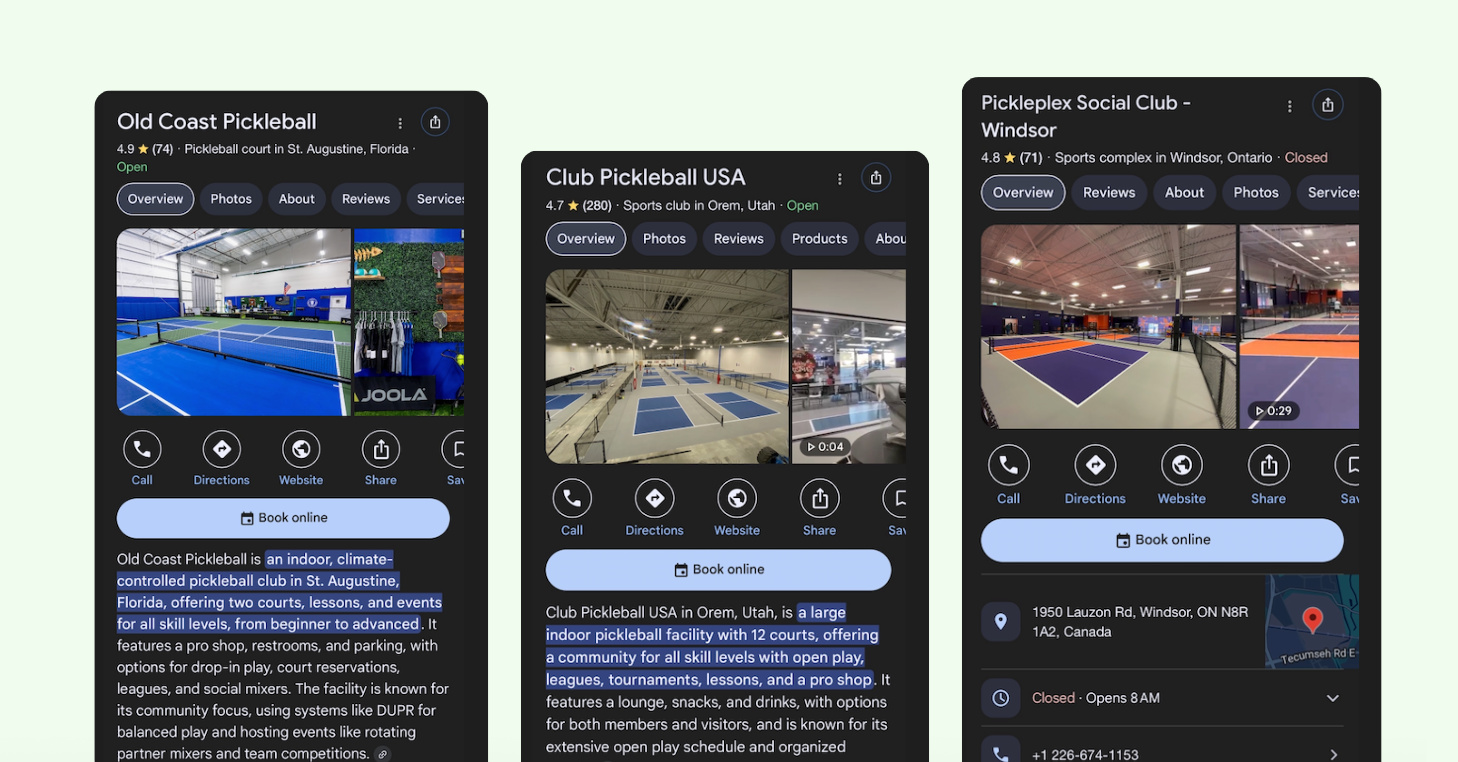
That means every player who finds your club’s listing on Google Search & Maps can now book with you on the spot. Once enabled, a “Book online” button will appear on your profile, turning casual searchers into confirmed bookings the moment the impulse to play strikes. No website to navigate, account to create, or membership required.
Players simply tap the button, browse available courts and events, and complete their booking faster than ever before. It’s the booking experience your players already expect, now finally available at your club.
The Reserve with Google integration is included at no additional cost for CourtReserve customers on Launch, Advance, Momentum, and Enterprise plans who use an active payment processor in the U.S. or Canada and have Public Booking enabled.
Note: This feature is not available on Legacy plans. If applicable, you’ll see an option to upgrade in the Public Booking section of your admin portal.
Your next player is already searching Google. Now they can book directly from your business listing.
Right now, players in your market are searching for “pickleball clubs near me” or “tennis courts open today.” They’re finding local club listings like yours, checking business hours, viewing photos, reading reviews, and then looking for a way to book.
For most clubs, that’s where the opportunity ends, as there’s no direct path forward. Players have to leave Google, find your website, and work through a booking process just to reserve a court or register for an event. Most never get there.
With the CourtReserve Public Booking + Reserve with Google integration enabled, those searches lead somewhere. A “Book online” button gives players a direct path from your Google Business Profile into your club’s Public Booking flow. There, they can view available courts and events and complete a booking in just a few taps.
That’s how your Google Business Profile becomes a growth engine, built entirely on demand that already exists in your market.
Video Transcript
0:011 secondYour next regular is someone who’s never heard of your club. They just want to play. Public booking from Court Reserve makes that effortless.
0:1111 secondsOne sharable link on your socials, your Google listing, or in an ad. Anyone can browse Open Courts, lessons, clinics, or
0:1818 secondsevents, and book in seconds. They pick a time, pay, and they’re done. No app, no membership required. When they arrive,
0:2828 secondsthey check in and go play. No front desk line, no friction. And every guest who books becomes a contact in your system,
0:3737 secondsready to be nurtured into a paying member. This goes beyond filling empty time slots.
0:4444 secondsEvery booking becomes an opportunity to grow.
0:4747 secondsPublic booking from Court Reserve for Every Club.
The easiest booking experience you can offer players
Friction kills bookings. Every extra step, an account to create, an app to download, a membership to hold, is a player who doesn’t make it through.
The Reserve with Google integration removes all of it. Players tap “Book online,” land in your Public Booking flow, and move through the experience the same way they book everything else in their lives: quickly, on their phone or any device, and without having to think too hard about it.
Every barrier you remove is a player who makes it through to a confirmed booking, meaning improved court utilization, increased revenue, and an overall better experience.
A 24/7 booking channel that runs itself
Most growth channels require ongoing investment — including new content, ad spend, and someone to manage it. The CourtReserve + Reserve with Google integration works differently.
Opt in once through your Public Booking settings and the channel runs itself. Players can find your Google Business Profile and book around the clock, with no ongoing management required from your team.
So while you’re focused on programming, members, and operations, new bookings are happening in the background. That’s a rare thing in club growth: meaningful impact without meaningful overhead.
The pipeline from first booking to long-term member starts the moment a player taps “Book online” on your Google Business Profile.
Every booking made through Reserve with Google flows directly into CourtReserve, where new players automatically become part of your club’s ecosystem as a captured lead.
From there, you have everything you need to turn a one-time visitor into a lasting relationship. Follow up after their visit. Invite them to clinics, leagues, and events. Move them toward a membership.
That’s how a single booking becomes a player relationship worth investing in.
Video Transcript
0:00Welcome everyone to today’s webinar. I’m Ben Verie Chapman, VP of marketing at Court Reserve. We’re going to talk about
0:077 secondssomething that can have a huge impact on your club, your Google business profile.
0:1212 secondsOver the next 10 minutes or so, I’m going to walk through a story that starts with a problem most clubs don’t even realize they have, and it will end
0:2121 secondswith a concrete plan that you and your team can actually implement this week.
0:2626 secondsUh some housekeeping before we kind of get started here. Please keep your uh microphones muted. There will be a Q&A
0:3535 secondsopportunity at the end. Uh I encourage you to use the chat uh available here.
0:4141 secondsWe have Jennifer, the amazing Jennifer, um assisting me here today. She’ll be able to um help you out in the in the uh
0:4848 secondsin the chat there. Um if not, I’ll get to those those questions at the end.
0:5353 secondsAlso, I’m happy to share that I will be emailing every attendee, every every registrant uh with these slides uh with
1:021 minute, 2 secondsa recording and a transcript. So, you can take this back and and kind of study it yourselves. So, uh let me let me kind
1:081 minute, 8 secondsof get started here. Um I’m going to paint a picture for us first. So, imagine a family just moved
1:171 minute, 17 secondsinto your into your area, your zip code, and they’re looking for somewhere to play. They do what everyone else does.
1:251 minute, 25 secondsThey Google it. Three clubs pop up.
1:291 minute, 29 secondsYours isn’t there. So, you actually just lost a potential member and you had no idea. This is the invisible club
1:371 minute, 37 secondsproblem, and it’s a lot more common than you might think. So, let’s look at the data.
1:431 minute, 43 secondsAlmost half of all Google searches have local intent. Uh that basically means somebody is searching for something nearby.
1:521 minute, 52 secondsAnd 76% of those searchers actually visit a business within 24 hours.
1:591 minute, 59 secondsOver a quarter make a purchase. So that’s some you know serious numbers there. So your Google business profile is really your front door, your kind of
2:082 minutes, 8 secondsdigital front door uh for all these folks who are searching things um in your in your zip code.
2:152 minutes, 15 secondsSo what exactly is a Google business profile, you might ask? It’s basically your free listing that shows up in a
2:222 minutes, 22 secondsGoogle search and Google maps. Think of it like your digital storefront. It shows everything a potential member may
2:312 minutes, 31 secondsneed. your club name, your address, your hours, photos, reviews, even a direct link to, you know, book your court. And the best part, this is completely free.
2:442 minutes, 44 secondsHere’s a great example of uh Ashley and Tim, found as a court reserve. They also own a fantastic pickle ball facility uh
2:522 minutes, 52 secondshere in St. Augustine, Florida. They have a very well-built out profile. So, when you’re looking for pickle ball in St. Augustine, there’s a very very
3:003 minutesstrong chance that Old Coast pickle ball is going to come up. And here’s how it looks on Google Maps.
3:073 minutes, 7 secondsI’m sure all of you have seen a Google business profile, maybe without realizing it. Um, but this is kind of basically the two ways that you can kind of discover these these profiles.
3:193 minutes, 19 secondsOkay, so here’s our game plan for this webinar.
3:233 minutes, 23 secondsUm, we’re basically going to go through five steps that will take your profile from invisible to irresistible. Uh,
3:313 minutes, 31 secondswe’ll go through each one with real examples and practical tips that you can apply right away. So, let’s jump into
3:393 minutes, 39 secondsstep one. The most important thing you can do right now is claim and verify your profile, your Google business
3:473 minutes, 47 secondsprofile. If you have not done this, nothing else really matters. Google may in fact have already created a listing
3:543 minutes, 54 secondsfor your club with incorrect information. You need to go claim it so you control what people see when they
4:024 minutes, 2 secondssearch for things in your zip code. Um, you can basically head over to business.google.com,
4:094 minutes, 9 secondssearch for your club or your facility and start that verification process. It usually takes a few days. It can take up
4:174 minutes, 17 secondsto a couple of weeks depending on uh the type of verification that you’re required to do.
4:234 minutes, 23 secondsStep two is to complete every single detail of your Google business profile.
4:294 minutes, 29 secondsGoogle rewards profiles that are fully filled out. We’re talking 70% more
4:364 minutes, 36 secondslikely to attract visits if you complete 100% complete your profile. uh go through every field. Your exact business
4:454 minutes, 45 secondsname, your correct address, phone number, local phone number, website link, your hours, including holiday
4:524 minutes, 52 secondshours, all the relevant categories and attributes. Just try not to skip anything.
4:584 minutes, 58 secondsHere’s a really cool tip that we’ve learned about. Uh categories are basically your secret weapon when it comes to Google. The category tells
5:075 minutes, 7 secondsGoogle when to show your profile during a search on uh Google search or Google Maps. So, your primary category is the most important thing for your business.
5:185 minutes, 18 secondsPick one that best describes, you know, your main business. If you’re a pickle ball club, you want to have your primary category as a pickle ball club. Uh then
5:275 minutes, 27 secondsadd every secondary category that you can think of that applies to your business. If you have, you know, tennis facilities, if you have a pool, a gym, a
5:365 minutes, 36 secondsgolf sim, add those two. Basically, the more relevant categories means more searches where you can have an opportunity to appear.
5:475 minutes, 47 secondsStep three, this is where we start to tell the visual story. Photos are super important for your profile. This is
5:555 minutes, 55 secondsagain where many clubs kind of leave the opportunity on the table. Uh, businesses with photos get 42% more direction requests.
6:056 minutes, 5 secondsUh, you may want to have things like exterior shots so people can find you when they’re driving around, court
6:126 minutes, 12 secondsphotos, action shots of real members at your club, event photos, even photos of your team and your front desk. And you
6:206 minutes, 20 secondsshould really be refreshing these every every few months. Here’s a great example of Wolverine Pickle Ball uh in Ann
6:286 minutes, 28 secondsArbor. They have a great uh suite of photos on their profile. You can get a sense immediately of what it would be
6:366 minutes, 36 secondslike to be at this club. Um and it just does a great job of of kind of selling selling the location.
6:436 minutes, 43 secondsStep four, super important, is reviews.
6:476 minutes, 47 seconds98% of consumers read online reviews before they choose a local business. This is from a Bright Local 2024 survey.
6:566 minutes, 56 secondsThat’s huge. The key is making it easy.
6:596 minutes, 59 secondsSo, after a great lesson, send a follow-up email with a direct link. Put a QR code on your front desk asking for
7:087 minutes, 8 secondsreviews. And if you’re using Court Reserve, which I know probably most of you are, you can actually automate some of this uh and request reviews after events and lessons.
7:197 minutes, 19 secondsHow you respond to reviews matters just as much as the reviews themselves. For positive reviews, you want to be
7:277 minutes, 27 secondsthanking those people personally and invite them back. For negative reviews, a a fast response time is critical. You
7:367 minutes, 36 secondsknow, acknowledge their experience and take it offline if you need to. You know, give them a call. But remember,
7:437 minutes, 43 secondsevery single response that you have is a public audition for your next member.
7:487 minutes, 48 secondsFuture prospects will judge your club by how you handle things like criticism.
7:557 minutes, 55 secondsUh here’s a couple of examples that I found um of some actual real reviews and you can see there the responses from the
8:038 minutes, 3 secondsowner. Uh this is just such a great lowhanging fruit uh for folks. Step five, you’ve done all that. Great.
8:118 minutes, 11 secondsYou have to stay active, right? So, um you you want your profile to sort of have uh have some personality, have some
8:198 minutes, 19 secondssome life to it. So, Google posts um are actually like mini social media updates that appear right on your business
8:278 minutes, 27 secondsprofile. Uh you can post about pretty much anything, events, offers, what’s new, general updates. But the key here
8:348 minutes, 34 secondsis consistency. Um you need to aim for at least one post per week. Again,
8:418 minutes, 41 secondsGoogle is rewarding profiles that uh are active, have activity on them. Uh and this will increase your visibility when people are searching.
8:518 minutes, 51 secondsHere’s a very simple content calendar that you could use. Um you can basically start using this right away. You know,
8:598 minutes, 59 secondsMonday you could feature uh member spotlight. Uh Wednesdays, you know, you could talk about some upcoming events
9:069 minutes, 6 secondsthat you have. Friday, run a weekend special or an offer. Sunday, start previewing the following week. Uh pro
9:149 minutes, 14 secondstip here, if you have the bandwidth, if you have the team, uh batch create your posts at the start of each month. If
9:229 minutes, 22 secondsyou’re up to speed with your programming, you should have at least some visibility into what’s coming at your club. Uh so you’re not kind of scrambling to get this done every day.
9:339 minutes, 33 secondsHere’s another feature that many clubs overlook. uh Google Q&A. So basically anyone can come to your profile and ask
9:429 minutes, 42 secondsand answer questions on your profile. Um if you don’t control the narrative as the owner operator, someone else will.
9:519 minutes, 51 secondsUh so the smart move here is to actually seed your own FAQ, your frequently asked questions. You can ask the common
9:589 minutes, 58 secondsquestions yourself and provide and provide the official answers and then you can come in and monitor those weekly for any new questions that you would
10:0610 minutes, 6 secondshave. This is different from reviews. Uh this is, you know, this is not somebody reviewing uh your your facility. This is
10:1410 minutes, 14 secondssimply somebody asking about it. So it’s a slightly different uh angle than the reviews there.
10:2010 minutes, 20 secondsOkay. So we flew through that, but now you’ve done all the hard work. You have the perfect profile. Uh your profile is
10:2810 minutes, 28 secondsclaimed. It’s complete. You have great photos. You’re getting reviews. You’re posting regularly. But here’s the thing.
10:3710 minutes, 37 secondsWhen a player finds your club on Google and wants to book, what actually happens?
10:4210 minutes, 42 secondsThey probably have to leave Google. They have to go to your website. They have to navigate some of your uh you know, booking system there. And most people
10:5010 minutes, 50 secondsdon’t actually make it. It’s kind of a broken journey. That is until now.
10:5610 minutes, 56 secondsWe’re very happy to announce uh a recent launch of ours called Reserve with Google. So, we actually partnered with
11:0311 minutes, 3 secondsGoogle themselves. They invited us uh to partner with them as one of their reservation partners. So, what does this
11:1011 minutes, 10 secondsmean? This puts a book online button directly on your Google business profile. So, players, anyone searching
11:1811 minutes, 18 secondsfor your club can now tap this. they land right into the public booking flow.
11:2411 minutes, 24 secondsThere’s no website. There’s no account to create. There’s no membership required. This is basically a 247 booking channel uh that runs itself once
11:3311 minutes, 33 secondsyou enable it. Uh it’s included at no extra cost on most of our our plans. We can provide some more information about
11:4011 minutes, 40 secondsthat. What does it look like? These are live customers that we have right now.
11:4411 minutes, 44 secondsUh we have over 400 clubs um using this feature. So, you’re going to get a big book online button on your
11:5311 minutes, 53 secondsGoogle business profile. It really couldn’t be any easier than that. Um, and you know, it looks great.
12:0012 minutesSo, how does it actually work? Well, a player searches for courts near them, as we were discussing earlier. Pickle ball near me, uh, pickle ball lessons near
12:1012 minutes, 10 secondsme, you know, and because your profile is so great, you’re now going to appear in those search results or the the results on a map. um they are basically
12:1912 minutes, 19 secondsgoing to land in your public booking page. They’re going to browse your available court time or events and they’re going to pick a time and pay and
12:2812 minutes, 28 secondsthey’re confirmed. It’s as simple as that. The whole thing takes less than a minute. Um there’s no friction. There’s no drop off. Uh we also have the added
12:3712 minutes, 37 secondsbonus here of uh providing a digital waiver ahead of them coming to your facility. So they can literally arrive
12:4412 minutes, 44 secondsand start playing, start enjoying your facilities. Super cool. Here’s the big picture. Uh reserve with Google isn’t just about filling empty court time.
12:5612 minutes, 56 secondsThis is actually about building your membership pipeline. So I believe the primary function um of a club is to
13:0313 minutes, 3 secondscreate new players uh not only for your club but for the community, for the for the industry. um stats indicate that
13:1213 minutes, 12 secondsbetween one and you know uh one in six of us are going to be playing a racket sports by the end of next year. So this is not this thing is not going anywhere.
13:2113 minutes, 21 secondsThere’s more and more people entering the space. So um basically every player who books through Google uh automatically becomes a lead in court
13:3013 minutes, 30 secondsreserve in your court reserve application. From there now you can follow up after their visit. You can invite them to more clinics, leagues,
13:3813 minutes, 38 secondsevents. you can move them towards a full membership. So, one tap on Google basically creates a member who could stay with you for years.
13:4913 minutes, 49 secondsThe best part, yes, it gets even better.
13:5113 minutes, 51 secondsUm, you can enable this thing in just a few minutes. So, you’re going to go into your settings in court reserve, find
13:5813 minutes, 58 secondsyour portal settings, you’re going to see public bookings, you’re going to activate reserve with Google. Um, that’s
14:0614 minutes, 6 secondsit. Once you do that, a book online button will start appearing on your Google business profile, providing you built it out. Um, it’s included at no
14:1514 minutes, 15 secondsextra cost for customers on most of our uh pricing plans there. You’re also going to have an active payment processor if you’re in the US or Canada.
14:2814 minutes, 28 secondsSo now, what happens once you’re you’re live with Reserve with Google, you want to see if it’s actually working. So you can’t really improve things if you can’t
14:3614 minutes, 36 secondsmeasure it. So Google business profile actually gives you a free dashboard um
14:4314 minutes, 43 secondsof insights that show you how people are finding you on Google. Um how many people see your profile, what sort of
14:5014 minutes, 50 secondsactions are they taking and also how things like your photos or your reviews are performing compared to similar businesses. So you can check these
14:5914 minutes, 59 secondsweekly or monthly and you can start to see trends.
15:0315 minutes, 3 secondsHere’s an example of what that looks like. Um, this is just a screenshot of a dashboard from uh, you know, one of our
15:1015 minutes, 10 secondsone of our customers, Anonymized. So, you’re just going to see some really cool data here. It’s very simple, very easy to understand, but it gives you a
15:1815 minutes, 18 secondslot of great insights about that local search activity um, around your business.
15:2515 minutes, 25 secondsSo before we wrap up, uh let’s kind of go through some of the mistakes that I’m seeing clubs make uh when it comes to their Google business profile.
15:3515 minutes, 35 secondsUh you really don’t want to have too many keywords in your business name.
15:4015 minutes, 40 secondsOkay, this will actually get your your business profile suspended because Google doesn’t like, you know, profiles that try and sort of cheat the system.
15:5015 minutes, 50 secondsSo, um, you know, there’s kind of restaurants out there is like restaurant near me. That’s literally the name of their their restaurant. You know, that’s
15:5815 minutes, 58 secondsprobably going to get you suspended from Google. So, just be mindful of the keywords that you put into your business name. Um,
16:0616 minutes, 6 secondsignoring those negative reviews, you know, I can’t stress enough um what that communicates to others who are looking
16:1416 minutes, 14 secondsat your your facility. you know, you need to get in front of those negative reviews if you are getting them uh responding and and trying to, you know,
16:2316 minutes, 23 secondsreally show others that you you’re taking action there and you have a live and active uh profile. Stock photos, you
16:3016 minutes, 30 secondsknow, don’t use stock photos. It’s better to have a bad photo from your iPhone. Um, we’re not all photographers
16:3816 minutes, 38 secondsafter all, but stock photos are going to again uh decrease the value of your profile with regards to Google. Um, so try and get some real photos in there.
16:4916 minutes, 49 secondsUm, it it will definitely help kind of present your your business profile as a real living thing. And uh, you know,
16:5716 minutes, 57 secondsdon’t just set up your profile and forget about it. You really need to come back and keep this thing, you know,
17:0417 minutes, 4 secondsmoving, right? um make sure everything is up to date. Again, Google will downrank your profile if you’re not
17:1217 minutes, 12 secondsgoing in there and sort of updating it and and publishing things and keeping ahead of stuff. So, you just want to keep Google happy basically. Um so, this
17:2217 minutes, 22 secondsis basically your action plan. Like I said, at the very top, we are going to send all of these slides around the recording too. So, you don’t have to
17:3117 minutes, 31 secondsmemorize any of this. You can actually use this as your guide. Um, but it’s very straightforward. You’re going to claim your profile. Like I said, if you
17:3817 minutes, 38 secondsdo anything, go do that. Um, nothing else matters unless you go claim and verify your your uh profile at business.google.com.
17:4717 minutes, 47 secondsYou’re going to fill out every detail.
17:4917 minutes, 49 secondsAs I said, you’re going to go and enable that reserve with Google and the public booking in court reserve. That’s going to give you the book online button on
17:5717 minutes, 57 secondsyour profile. There’s no other way to get it. um without court reserve. None of our competitors offer that. Uh you’re
18:0318 minutes, 3 secondsgoing to upload 10 real photos or 10 or more real photos and you’re going to ask five of your happiest members for some
18:1118 minutes, 11 secondsreally amazing reviews, five-star reviews. Uh you’re going to start publishing some of your own content on
18:1818 minutes, 18 secondson Google and seed your Q&A and then try and keep that up every week, every month. If you follow this plan, I can
18:2618 minutes, 26 secondspromise you, you will see results within 30 days. You’re going to go into your dashboard on the profile and you’re going to see all of your stats creeping
18:3518 minutes, 35 secondsup. Um, but you do have to tend to that yard. It’s it’s very much like tending to your, you know, your plants and your vegetables. You have to go in there and like show it some love.
18:4618 minutes, 46 secondsSo, remember that family who searched for a club and yours didn’t show up?
18:5218 minutes, 52 secondsWell, if you follow the steps that I’ve laid out today um and activate reserve with Google, next time they search, your
19:0019 minutesclub is going to be the one that they find. They’ll be able to go and book a call even before they leave the search results. Uh that’s me done with my
19:0919 minutes, 9 secondsslides. Thanks so much for joining. I’m happy to take any any questions or uh feedback that you have. Please drop that in the chat.
19:1919 minutes, 19 secondsGreat, Ben. Thank you so much. Uh we do have two questions from Joe. Um the first um is specific to him. Um but the
19:2919 minutes, 29 secondssecond I think could several people on here could could benefit from the second question. The first question is if he
19:3619 minutes, 36 secondsdoes not have a physical location or set hours um or a phone number um would this work for him?
19:4519 minutes, 45 secondsI’m I’m going to hedge on it not working because you do need a you do need a physical location for a Google business
19:5219 minutes, 52 secondsprofile. That’s how you verify your profile with Google. So, I’m going to hedge on saying no, but we can certainly
19:5919 minutes, 59 secondsverify that for you um after this webinar and follow up with that answer.
20:0420 minutes, 4 secondsOkay. First, perfect. And then next um where I think we can u help um is is it
20:1320 minutes, 13 secondspossible to limit public res registration just a special events like a tournament or a special session? And I
20:2020 minutes, 20 secondshave uh an answer on that one. Uh basically we can make a membership type specifically for public bookings and
20:2720 minutes, 27 secondsthen make it not public. Um most events um only allow to be public on a specific event. So basically, you would just
20:3520 minutes, 35 secondsallow specific events to be public. Um, and then Joe, I do see that you’re looking for some more direction. We will have someone reach out to you after this
20:4420 minutes, 44 secondscall uh so that so that we can help a little bit further. Um, next, Ben, Nathan is asking, “How does the booking
20:5220 minutes, 52 secondswith Google feature work with a Brieo integration?” Brievo being the access control, correct?
21:0021 minutesYes.
21:0121 minutes, 1 secondYeah. So we uh Brievo would work as normal as it does with your with your court reserve
21:0921 minutes, 9 secondssetup. Um it’s planned that we fully integrate the public booking with the access control
21:1621 minutes, 16 secondsuh partners that you may be using Brevo remote lock and such. So um Brievo would work as normal uh as it does with court
21:2421 minutes, 24 secondsreserve right now and we’re planning that integration connection with the public booking flow.
21:3121 minutes, 31 secondsWonderful. As of now, that’s all of the questions that we have.
21:3521 minutes, 35 secondsGreat. Well, like I said, um I’m going to share this uh presentation with everybody who registered and joined
21:4321 minutes, 43 secondstoday. Um I encourage you to go look at some of these links. We have a setup guide uh on the court reserve public
21:5021 minutes, 50 secondsbooking and reserve with Google. And also, I’m providing a link to Google’s official kind of how to go claim your
21:5821 minutes, 58 secondsGoogle business profile. So you can actually follow the steps that they recommend and you’ll see some of the requirements around verifying your uh
22:0522 minutes, 5 secondsyour location. Um Ravi looks like you have raised your hand there. Not sure how that works.
22:1322 minutes, 13 secondsYes, I can. There’s a Yes, there’s a question from Ravi. As our facility is being built, but we
22:2022 minutes, 20 secondslaunched a membership drive, can this be added with Google integration? I understand we need to have our signature or our
22:2822 minutes, 28 secondssignates or your sign signage on the door for Google registration.
22:3422 minutes, 34 secondsUm, Ben, I would recommend that
How CourtReserve + Reserve with Google works for your racquet club
Reserve with Google connects your CourtReserve Public Booking page directly to your Google Business Profile. Once enabled, here’s what you can expect:
“Book online” button Your club’s Google Business Profile displays a “Book online” button. Players tap it and land directly in your Public Booking flow, where they can view availability and complete a booking.
“Services” tab (mobile only) On mobile, your Google Business Profile also displays a Services tab, powered by CourtReserve. Players can browse types of court reservations and events, view duration and pricing, and tap “Book” to reserve. It’s a detailed, browsable view of everything your club has to offer, right on your listing.
Real-time availability, instantly accessible When players click through, they see your live court and event availability pulled directly from CourtReserve. What’s available in CourtReserve is exactly what players see. It’s current, accurate, and ready to book.
Rules & pricing stay in your control Reserve with Google works within your existing Public Booking setup. Your pricing, booking rules, and availability settings stay exactly as you’ve configured them.
Turn Google Search into a direct booking channel — letting players discover your club and reserve courts instantly.
How to enable Public Booking + Reserve with Google
To get started, you’ll need an active Google Business Profile. Your profile is what connects to Reserve with Google and where the “Book online” button will appear. If you don’t have a profile yet, claim and verify your business on Google before proceeding.
From there, make sure your profile is complete and up to date. Accurate hours, quality photos, and a few member reviews go a long way in converting players who find your listing.
With your profile ready, enabling Reserve with Google takes just a few steps. Here’s how to turn it on:
Go to Settings → Portal Settings → Public Bookings
Confirm Public Booking is enabled (Want Public Booking? Turn it on here)
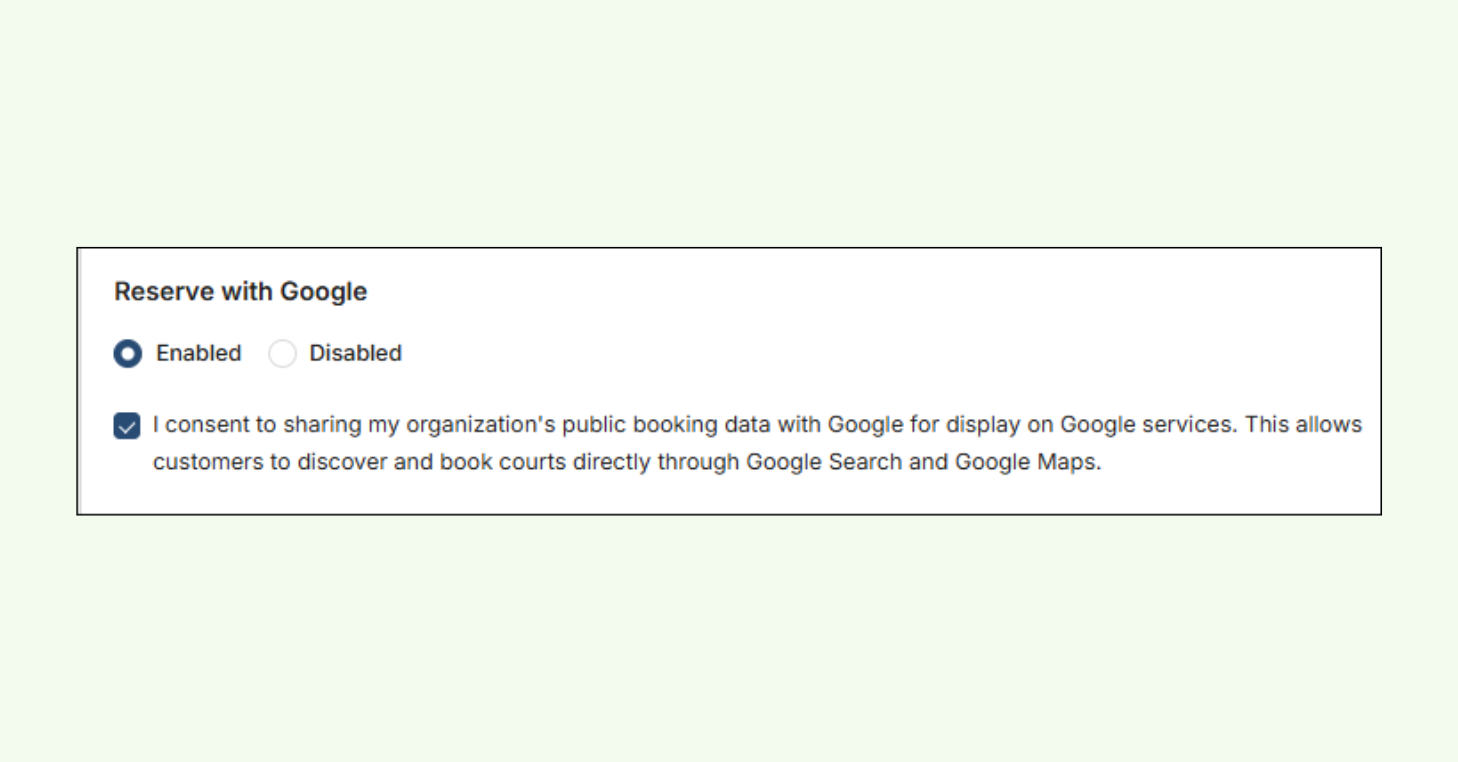
Find the Reserve with Google section and select Enabled
Your organization’s address saved in the Organization Information screen is used to connect your CourtReserve account to your Google Business Profile. If no address is on file, you’ll be prompted to enter one. An address is required to enable the integration.
Check the box to confirm you agree to share your booking data with Google
Click Save
Once saved, your Public Booking link is connected to your Google Business Profile, and the “Book online” button will begin appearing on your listing.
CourtReserve Admin Portal showing the Reserve with Google settings panel.
New players are one search away. Turn on Reserve with Google today.
Players are searching for clubs in your market right now.
Reserve with Google makes sure your club is ready when they find you. Every player who taps “Book online” moves through your Public Booking flow and lands directly in CourtReserve, ready to be nurtured into a member.
Enable it and watch your Google Business Profile become your most powerful and profitable booking channel.
This comprehensive ebook introduces the Club Growth Flywheel - a proven growth framework for racquet sports clubs. With actionable guidance and practical tools, it shows you how to turn daily operations into a system that supports long-term, sustainable growth without added complexity.
Simply give us your email below and we will send over the free guide instantly to your inbox!
The Club Growth Flywheel Toolkit
A practical framework for building momentum in racquet sports clubs.