There are new ways to tackle some of your club’s biggest priorities right inside CourtReserve, from filling open court time to reducing manual work and reaching new players.
We’ve rounded up the latest releases from late July through early October 2026, including new reporting, promotional tools, integrations, and CourtReserve Network. Here’s the rundown.
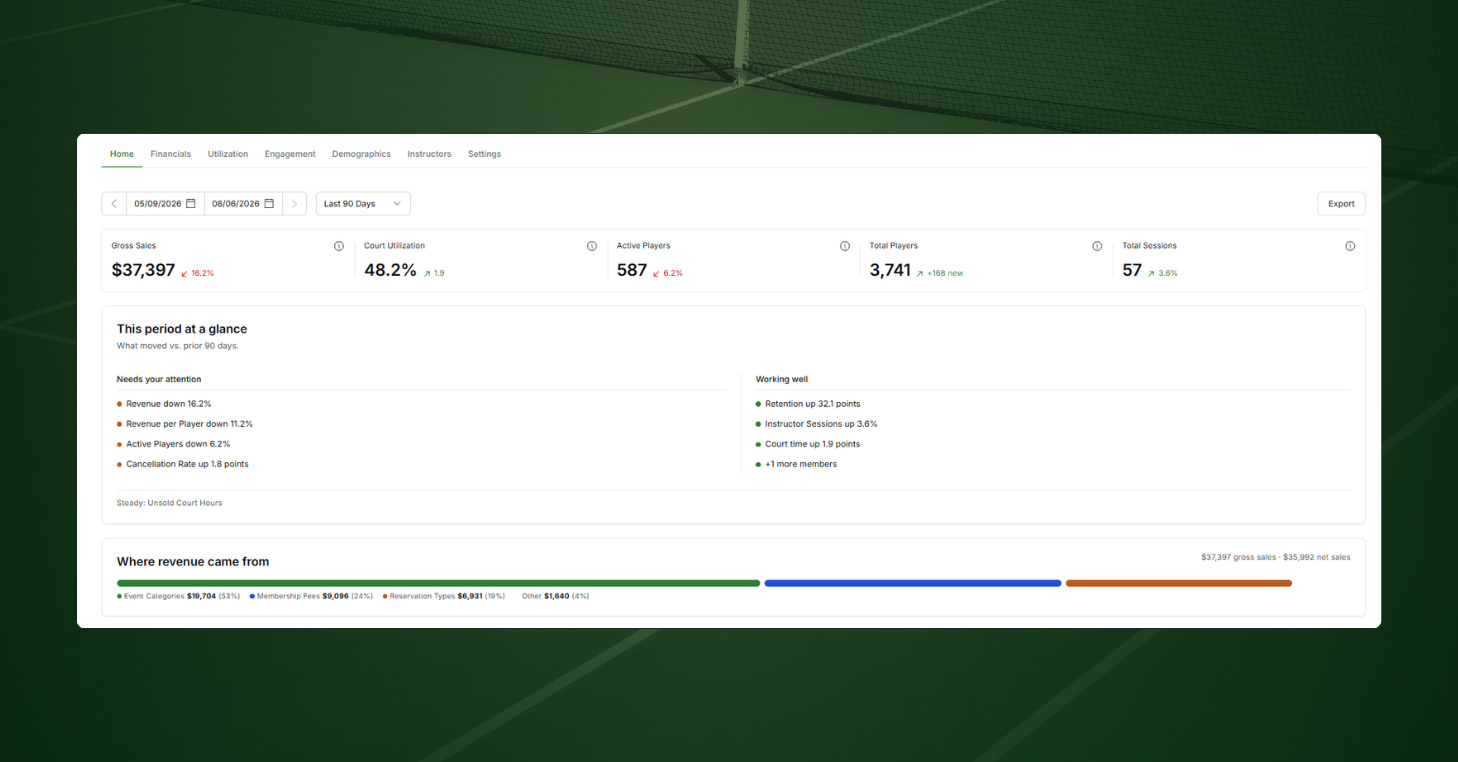
CourtReserve Pulse: Built-in reporting for every part of your club
Knowing how your club is performing shouldn’t mean pulling five reports before your morning coffee. Pulse is CourtReserve’s built-in reporting dashboard, covering revenue, court usage, member engagement, player demographics, and instructor performance across six tabs.
Pulse refreshes your club data nightly, with no setup or manual reports required. Key metrics show how performance compares with previous periods, helping you spot slow hours, revenue gaps, and drops in member activity while there’s still time to act.
How it works
- Start with the big picture: The Home tab sorts key metrics into areas that need attention and areas that are going well, and one date picker controls all six tabs.
- Track what’s changing: Compare key metrics with previous periods to see where revenue, court utilization, and member engagement are trending.
- Explore the details: Dive into booking heatmaps, players by spend, inactive member lists, and a player map by zip code across the dashboard.
- Make it your own: Hide the tabs and metrics you don’t need, save filter views for court usage, and choose which sub-admins see each tab.
- Share and connect your data: Export any tab as a PDF or CSV, and Enterprise organizations can pull Pulse metrics through the Enterprise API.
CourtReserve Pulse is included for all clubs except those on Legacy pricing plans.
CourtReserve Network™: Get found by nearby players looking for a place to play
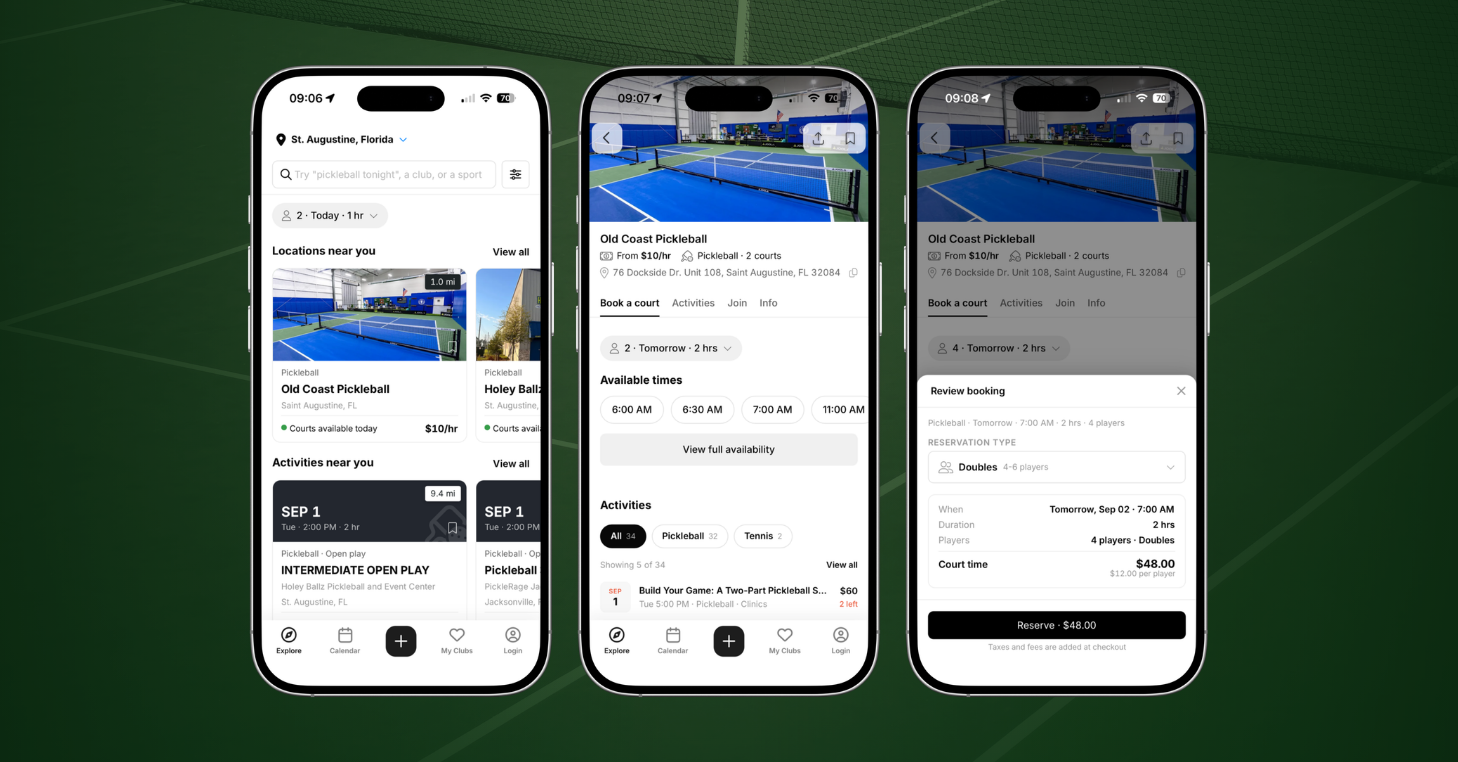
A player looking for a court tonight or a clinic this weekend may not know your club is an option. CourtReserve Network brings clubs, courts, activities, and instructors into one searchable experience in the CourtReserve app, helping players discover what’s available nearby.
Players can compare availability, pricing, and programs before choosing where to play. Your club gains another way to reach players beyond those already searching for you by name, opening the door to new bookings, program registrations, and lasting player relationships.
How it works
- Reach players searching nearby: Players can filter activities by sport, location, date, court type, surface, price, amenities, and more.
- Show what your club offers: Your listing can display available courts, upcoming activities, pricing, photos, amenities, and instructor profiles.
- Let players explore before joining: Players can browse nearby clubs, courts, and activities without creating an account or logging in.
- Connect discovery to bookings: Clubs with Public Booking enabled can let players reserve courts and register for eligible activities directly through the app, without creating an account.
- Stay in control of your listing: Review and update your club details, photos, and amenities, or turn off Network visibility in Organization Settings where available.
CourtReserve Network is currently in beta across Florida and Utah, with access automatically available to clubs and players in both states. More regions will gain access as the rollout continues.
Promo Codes: Drive demand where your club needs it most
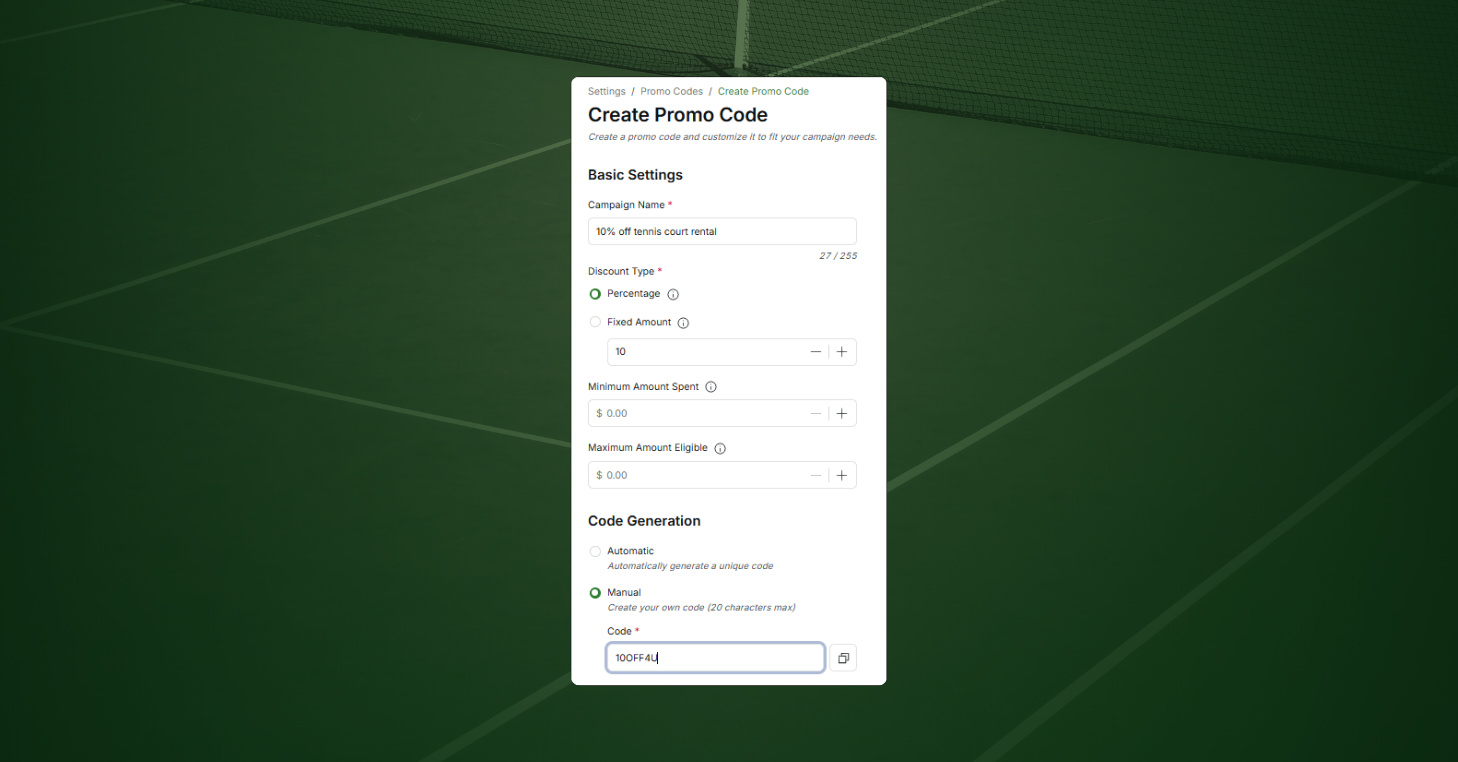
Promo Codes let you create targeted discounts around your club’s goals, whether that’s filling slower court hours, increasing clinic registrations, or encouraging membership purchases.
You can now create and manage those offers directly in CourtReserve without changing your regular prices or having staff apply discounts manually. As players use your codes, built-in reporting tracks redemptions and associated sales, helping you see which promotions are worth repeating or adjusting.
How it works
- Choose who qualifies: Make a code available to anyone, or limit it to specific membership types, member groups, or individual players.
- Target specific purchases: Apply discounts to reservations, lessons, events, leagues, memberships, packages, point-of-sale purchases, and more.
- Set your own limits: Choose percentage or dollar discounts, minimum spending requirements, usage limits, campaign dates, and eligible booking days and times.
- Make redemption easy: Players can enter eligible codes at checkout through the member portal, mobile app, or Public Booking. Staff can also apply codes through the admin panel or point of sale.
- Track campaign performance: See redemptions, total discounts, and sales associated with each promo code to help evaluate your offers.
Promo Codes are available at no additional cost on current CourtReserve plans.
New Player Rating Integrations: Better-matched play, less manual work
Every new clinic, league, or level-based event can mean another round of rating checks and eligibility questions for your staff. Two new integrations bring official player ratings directly into CourtReserve: USTA Connect for tennis and World Padel Rating (WPR) for padel.
Both integrations automatically update ratings on linked member profiles, giving your team the information to set registration requirements, find players by skill level, and organize better-matched programs with less manual work.
How it works
- Keep official ratings current: USTA Connect syncs WTN singles, WTN doubles, and NTRP ratings weekly. WPR updates Competition and Social ratings daily. Both support manual updates when needed.
- Set rating-based registration rules: Control event eligibility using WTN, NTRP, or WPR rating ranges, with additional confidence-level requirements available for padel events.
- Find and reach players by skill level: Filter the Members Report by either rating system. For tennis, you can also send targeted emails, texts, and push notifications based on player ratings.
- Check rating confidence: View confidence indicators alongside WTN and WPR ratings to better understand the reliability of each player’s rating.
- Make account linking easy: Players can connect their USTA or WPR accounts through CourtReserve, and admins can link accounts on their behalf.
Both integrations are included with Advance and Momentum plans. Each is available on the Launch plan for $25 per month.
Pickleheads Integration: Easier league nights from registration to standings
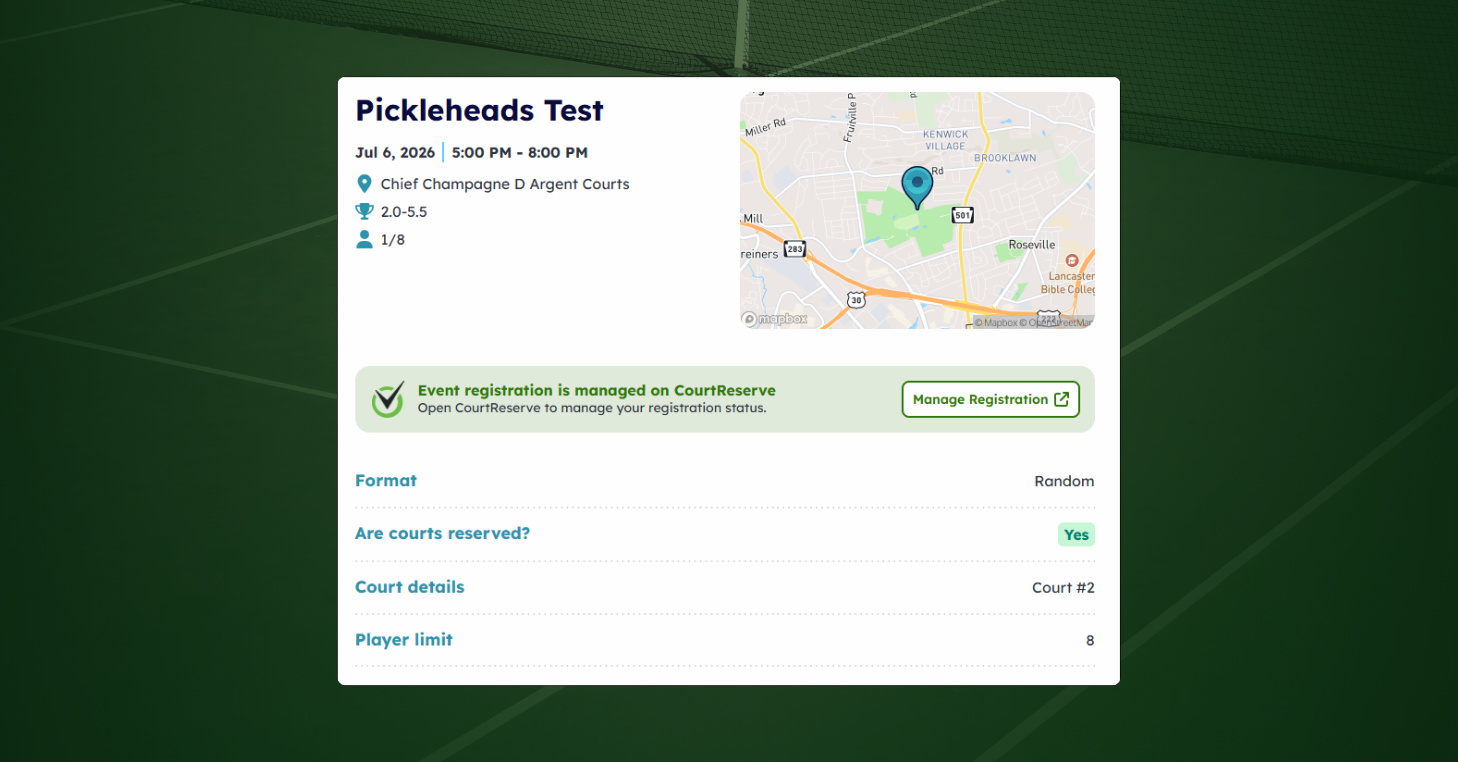
Once a pickleball league gets underway, keeping matchups, scores, and standings current can become a job of its own. The Pickleheads integration connects registration and payments in CourtReserve with league management in Pickleheads.
Mark an event as a Pickleheads event, and dates and registrants sync automatically. Players can find their matchups, enter scores, and follow standings throughout the season, while your staff spends less time updating rosters and chasing down results after each session.
How it works
- Keep league registration in CourtReserve: Players continue signing up and paying for pickleball leagues through CourtReserve.
- Run matchups and standings in Pickleheads: Players see their matchups, enter their own scores, and follow live standings throughout the season.
- Sync league details automatically: Registrations, event changes, and cancellations sync from CourtReserve to Pickleheads, keeping rosters and schedules up to date.
- Connect check-ins and DUPR results: Front desk and kiosk check-ins update player attendance in Pickleheads, while match results flow to DUPR for players with linked accounts.
- Choose how players participate: Require players to link their Pickleheads accounts or allow guest registrations, with options to set requirements by club or event.
The Pickleheads integration is available to all clubs except those on Legacy pricing plans. Separate Pickleheads fees may apply.
Track Tennis Integration: Hands-free video recording for your players
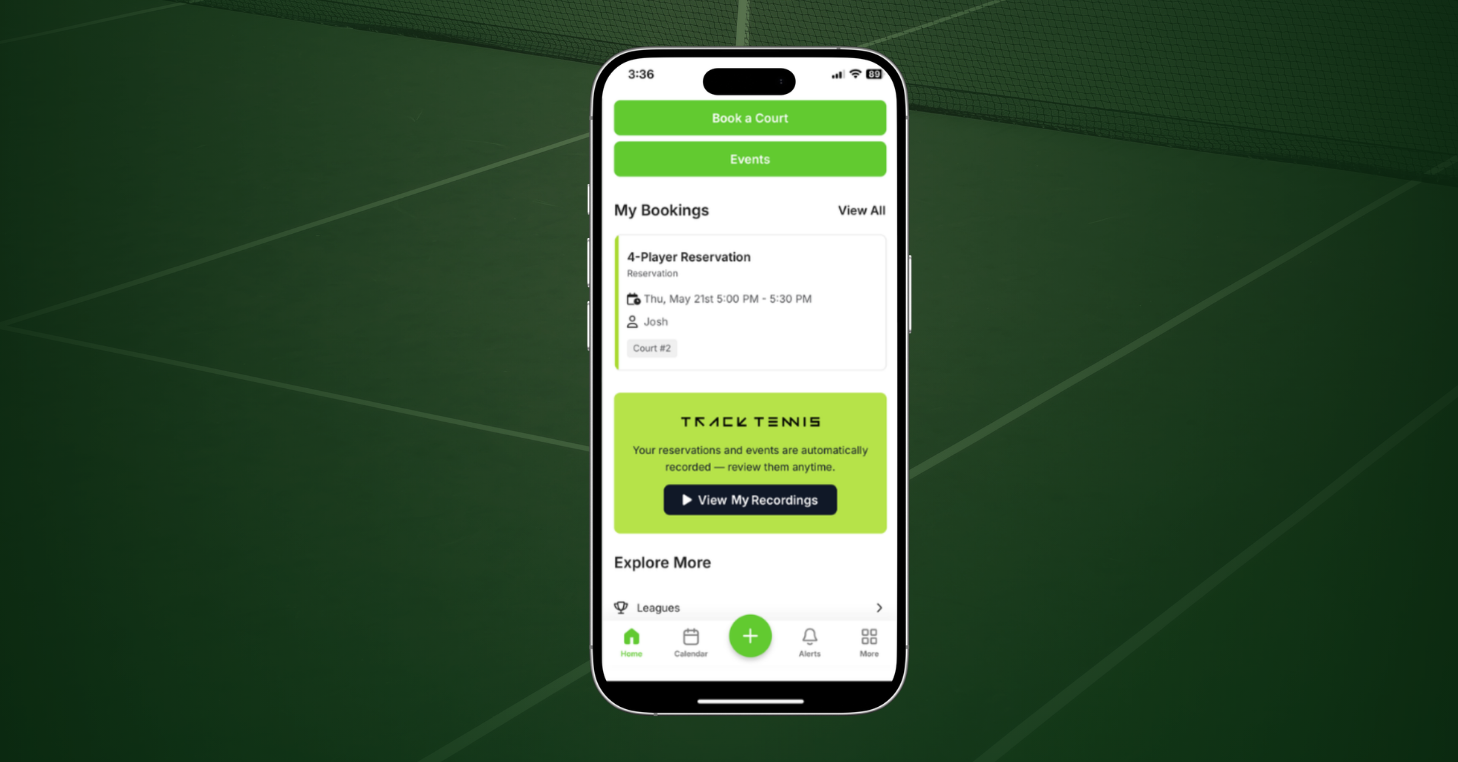
Many players want to watch their matches back, but starting and stopping recordings adds another task for them and your staff. With the Track Tennis integration, eligible reservations and event registrations trigger court recordings automatically, so there’s nothing to press on court.
Finished videos appear in the CourtReserve app and can also be delivered by text or email. And you decide who’s eligible and how to price recordings, so match video can become a membership perk or a paid add-on.
How it works
- Record court time automatically: Eligible reservations and event registrations trigger recording through Track Tennis, without players having to start or stop anything.
- Control who’s recorded: Set eligibility by membership type, and let players or admins turn automatic recording on or off for individual accounts.
- Set your own pricing: Offer recordings at no additional cost or charge hourly or fixed fees by membership type.
- Give players easy access: Completed videos appear under My Recordings in the CourtReserve app, with delivery also available by text or email.
- Use existing cameras when possible: Track Tennis can review your club’s existing IP cameras to determine whether they’re compatible, potentially reducing new equipment costs.
Track Tennis is included with Advance, Momentum, and Enterprise plans and available on the Launch plan for $25 per month. Additional Track Tennis charges apply.
More improvements to the tools your club relies on
The big releases are only part of what’s new. Here’s a look at updates and improvements that rolled out across Public Booking, scheduling, point of sale, and reporting.
- Public Booking for lessons: Players can now book and pay for lessons with your instructors through Public Booking, without creating an account. Available to all clubs using Public Booking.
- Waivers before payment: Guests complete required waivers during Public Booking checkout for reservations, lessons, and events, reducing unsigned forms at check-in.
- More control over public event registration: Choose which event categories guests can register for without logging in, while keeping others behind a member login.
- Fixed Duration rules in Public Booking: Public Booking now follows Fixed Duration rules on eligible custom schedulers, keeping booking lengths and prices consistent with your settings.
- Reserve with Google enabled by default: Qualifying clubs using Public Booking now automatically get a Book online button on their matching Google Business Profile, giving players a direct path from search to booking.
- Mobile lesson scheduling: Admins can book lessons directly from an open slot on the mobile scheduler, without creating and converting a court reservation.
- Instructor registration alerts: Instructors receive notifications when players join their assigned events, including registrations completed by staff.
- Member-aware point of sale: Selecting a member at checkout displays their membership type, account balance, credits, and available payment methods.
- Itemized POS sales: Multi-item purchases now appear as individual fee lines in financial reports, making purchases easier to review and individual items easier to refund.
- Enterprise receipts by location: Enterprise accounts can review subscription charges by location and download itemized PDF receipts for easier reconciliation.
- Expanded API capabilities: New endpoints and data fields support membership reporting, event tags, featured events, revenue categories, and organization-level court utilization.
Stay up to date on the latest CourtReserve releases
Whether you’re looking to fill more court time, reduce administrative work, or improve the player experience, there’s plenty here to explore and put to work at your club.
Much more is on the way, including the continued expansion of CourtReserve Network into new regions. Keep up with the latest releases and improvements in our full release notes. Ready to try something new? Visit our Help Center for setup guidance.